
Kia Cee'd: Interior features / Shopping bag holder
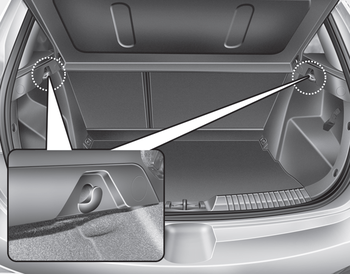
CAUTION
- Do not hang a bag weighing more than 3 kg (7 lbs.). It may cause damage to the shopping bag holder.
- Do not hang the frail objects when you drive rough road, the objects may be damaged.
 Applying the shackle on the guide rail
Put the shackle (A) in the position
where the shackle is put in the rail.
To move the shackle, press the button
(1) and move the shackle along the rail.
Make sure the shackle is clicked ...

Other information:
Kia Cee'd JD Owners Manual: Using USB Mode
Playing/Pausing USB Files
Once a USB is connected, the mode
will automatically start and begin
playing a USB file.
While playing, press the button
to pause and press button to
play.
✽ NOTICE
Loading may require additional
time if there are many files and
folders within the ...
Kia Cee'd JD Owners Manual: Speed Limit Information Function (SLIF)
The system displays the information of
speed limit and no passing restriction to
the driver in both the instrument cluster
and navigation screen. SLIF detects traffic
signs with camera system attached
behind the top of the windscreen.
The SLIF also utilizes the navigation
information ...
© 2017-2026 www.kceed.com
