
Kia Cee'd: Luggage rail system (wagon) / Applying the shackle on the guide rail
Kia Cee'd JD Owners Manual / Features of your vehicle / Interior features / Luggage rail system (wagon) / Applying the shackle on the guide rail
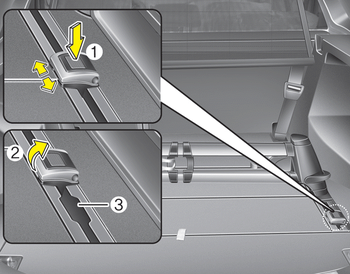
- Put the shackle (A) in the position where the shackle is put in the rail.
- To move the shackle, press the button (1) and move the shackle along the rail.
- Make sure the shackle is clicked into place.
- To fix the luggage, pull up the hook (2) in the middle cargo bay.
- Now you can mount e.g. belt to fix the luggage in the hook.
- The shackle cannot be used in the position where the shackle is put in and out of the rail (3).
CAUTION
Tensile force : max. 30 kgf. for 1 shackle
 Build in segmentation bar
Put both pillars (A) from the segmentation
bar in the openings from the rail.
To move the segmentation bar, put
your hand on the side of the pillar and
push down the lever arm (B).
Mak ...
 Shopping bag holder
CAUTION
Do not hang a bag weighing more
than 3 kg (7 lbs.). It may cause
damage to the shopping bag
holder.
Do not hang the frail objects
when you drive rough road, the
objects ...
Other information:
Kia Cee'd JD Service Manual: Multimedia Jack Repair procedures
Removal
1.
Remove the crash pad center lower panel.
(Refer to Body - "Main Crash Pad Assembly")
2.
Disconnect the crash pad center lower panel connector (A).
3.
Remove the multim ...
Kia Cee'd JD Owners Manual: Driving at night
Because night driving presents more
hazards than driving in the daylight, here
are some important tips to remember:
Slow down and keep more distance
between you and other vehicles, as it
may be more difficult to see at night,
especially in areas where there may
not be any street ...
© 2017-2026 www.kceed.com
