
Kia Cee'd: Features of your vehicle / Rearview camera
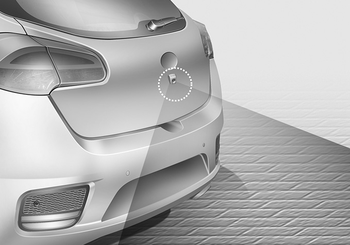
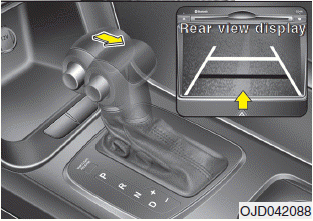
The rearview camera will activate when the back-up light is ON with the ignition switch ON and the shift lever in the R (Reverse) position.
This system is a supplemental system that shows behind the vehicle through the navigation monitor while backing-up.
WARNING
- This system is a supplementary function only. It is the responsibility of the driver to always check the inside/outside rearview mirror and the area behind the vehicle before and while backing up because there is a dead zone that can't see through the camera.
- Always keep the camera lens clean. If lens is covered with foreign matter, the camera may not operate normally.
 System malfunction
If there is a problem with the system,
when the system is turned on, the
above message will appear. Also, the
indicator on the button will not light up
and a beep sound will be heard ...
 Hazard warning flasher
The hazard warning flasher should be
used whenever you find it necessary to
stop the vehicle in a hazardous location.
When you must make such an emergency
stop, always pull off the road as f ...
Other information:
Kia Cee'd JD Service Manual: Power Mosfet (DATC) Repair procedures
Inspection
1.
Turn the ignition switch ON.
2.
Manually operate the control switch and measure the voltage of the blower
motor.
3.
Select the control switch to raise the voltage until high speed.
...
Kia Cee'd JD Owners Manual: Steering wheel audio controls
The steering wheel may incorporate
audio control buttons.
CAUTION
Do not operate audio remote
control buttons simultaneously.
VOLUME (+/-) (1)
Press the lever upward (+) to
increase the volume.
Press the lever downward (-) to
decrease the volume.
SEEK/PRESET (/)
(2)
The SE ...
