
Kia Cee'd: ABS(Anti-Lock Brake System) / Rear Wheel Speed Sensor Repair procedures
Kia Cee'd JD Service Manual / Brake System / ABS(Anti-Lock Brake System) / Rear Wheel Speed Sensor Repair procedures
| Removal |
| 1. |
Remove the rear wheel and tire.
|
| 2. |
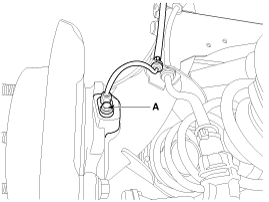
Remove the rear wheel speed sensor mounting bolt (A).
|
| 3. |
Remove the rear wheel speed sensor cable mounting bolt.
|
| 4. |
Remove the rear wheel house trim.
(Refer to Body - "Rear wheel house trim")
|
| 5. |
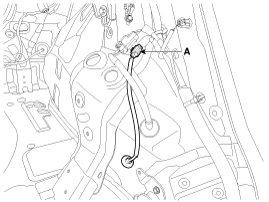
Disconnect the rear wheel speed sensor connector (A), and than remove
the rear wheel speed sensor.
|
| 6. |
Install in the reverse order of removal.
|

 Rear Wheel Speed Sensor Components and components location
Components
1. Rear wheel speed sensor
2. Rear wheel speed sensor connector
...

Other information:
Kia Cee'd JD Owners Manual: Sport mode
■ Normal vision
■ Supervision
The steering wheel becomes heavier.
The sport mode is usually used when
driving in highway.
CAUTION
For your safety, if you press the
steering mode button while operating
the steering wheel, the LCD
display will change, but the steering
ef ...
Kia Cee'd JD Service Manual: Inhibitor Switch Description and operation
Description
The inhibitor switch is mounted on the transmission case. It includes the electric
switch plate circuit and is directly connected with the transmission lever via
transmission cable.
When the driver shifts the transmission lever, the contact point on the switch ...
© 2017-2026 www.kceed.com
