
Kia Cee'd: Lighting / Rear fog light
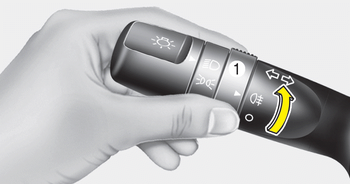
■ Type A
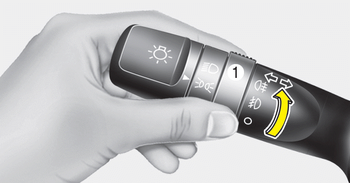
■ Type B
To turn the rear fog lights on, turn the rear fog light switch (1) to the on position when the headlight is turned on.
Also, the rear fog lights turn on when the rear fog light switch is turned on after the front fog light switch (if equipped) is turned on and the headlight switch is in the position light position.
To turn the rear fog lights off, turn the rear fog light switch to the on position again. Rear fog light is located only on the driver’s side (for wagon).
 Front fog light
Fog lights are used to provide improved
visibility when visibility is poor due to fog,
rain or snow, etc. The fog lights will turn
on when the fog light switch (1) is turned
on after the pos ...
 Daytime running light
Daytime Running Lights (DRL) can make
it easier for others to see the front of your
vehicle during the day. DRL can be helpful
in many different driving conditions,
and it is especially helpfu ...
Other information:
Kia Cee'd JD Owners Manual: To set speed limit
1. Move the lever up () on the
steering
wheel, to turn the system on.
The speed limit indicator light will illuminate.
2. Move the lever down (to SET-).
3. Move the lever up (to RES+) or down
(to SET-), and release it at the desired
speed. Move the lever up (to RES+) or
down (to S ...
Kia Cee'd JD Owners Manual: Static bending light
While driving the corner, for your sight
and safety, the static bending light turns
on automatically. The system will operate
automatically as follows:
When vehicle speed is under 10km/h
and steering wheel angle approximately
80 degrees.
When vehicle speed is over 10km/h
and ste ...
