
Kia Cee'd: Operation of the rear parking assist system / Operating condition
Kia Cee'd JD Owners Manual / Features of your vehicle / Rear parking assist system / Operation of the rear parking
assist system / Operating condition
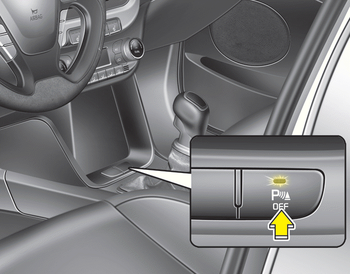
- This system will activate when the indicator
on the rear parking assist OFF
button is not illuminated.
If you desire to deactivate the rear parking assist system, press the rear parking assist OFF button again. (The indicator on the button will illuminate.) To turn the system on, press the button again. (The indicator on the button will go off.) - This system will activate when backing
up with the ignition switch ON.
If the vehicle is moving at a speed over 5 km/h (3 mph), the system may not be activated correctly. - The sensing distance while the rear parking assist system is in operation is approximately 120 cm (47 in.).
- When more than two objects are sensed at the same time, the closest one will be recognized first.

 Types of warning sound
When an object is 120 cm to 61 cm (47
in. to 23.6 in.) from the rear bumper:
Buzzer beeps intermittently
When an object is 60 cm to 31 cm
(23.6 in. to 12.2 in.) from the rear
bumper: ...
Other information:
: Android Auto (If Equipped)
Connect your device to a USB port.
Follow the instructions on the
touchscreen.
Note: You might need to enable Android
Auto from the settings menu.
Note: Certain features of the system are
not available when you are using Android
Auto.
Switching Android Auto Off
Select the settings option o ...
: Using the Remote Control
Use your remote control to access various
vehicle systems.
Note:The buttons on your remote may vary
depending on the vehicle region or options.
Unlock
Press the button to unlock all
doors.
Lock
Press the button to lock all
doors.
Remote Start (If Equipped)
Press the button to remote start.
L ...
© 2017-2026 www.kceed.com
