
Kia Cee'd: AVN System / Multimedia Jack Description and operation
Kia Cee'd JD Service Manual / Body Electrical System / AVN System / Multimedia Jack Description and operation
| Description |
The multimedia jack on the console upper cover is for customers who like to
listen to external portable music players like the MP3, iPod and etc., through
the vehicle's sound system when it is linked to this jack. The customer has
this added option.
In case of distortions from media connected to the AUX source, the audio unit
may not be defective but the output level of the used media does not match the
specification of the AUX input.
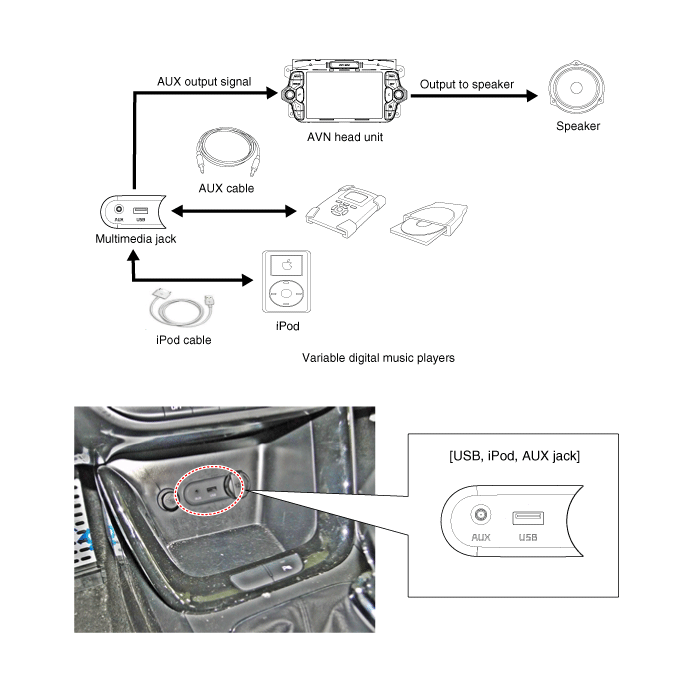
 Multimedia Jack Schematic diagrams
Circuit Diagram
...
 Multimedia Jack Repair procedures
Removal
1.
Remove the crash pad center lower panel.
(Refer to Body - "Main Crash Pad Assembly")
2.
Disconnect the cra ...
Other information:
Kia Cee'd JD Owners Manual: Using the clutch
The clutch pedal should be depressed all
the way to the floor before shifting, then
released slowly. The clutch pedal should
always be fully released while driving. Do
not rest your foot on the clutch pedal
while driving. This can cause unnecessary
wear. Do not partially engage the
clu ...
Kia Cee'd JD Service Manual: Ignition Coil Specifications
Specification
Item
Specification
Primary Coil Resistance (Ω)
0.75 ± 15% [20°C (68°F)]
Secondary Coil Resistance (kΩ)
5.9 [20°C (68°F)]
...
© 2017-2026 www.kceed.com
