
Kia Cee'd: Dual Clutch Transmission Control System / Input Speed Sensor 2 Repair procedures
Kia Cee'd JD Service Manual / Dual Clutch Transmission(DCT) System / Dual Clutch Transmission Control System / Input Speed Sensor 2 Repair procedures
| Inspection |
Refer to DTC code "P2765, P2766" Input Shaft Speed Sensor.
| Removal |
| 1. |
Turn off the ignition switch and then disconnect the battery (-) cable.
|
| 2. |
Remove the under cover.
|
| 3. |
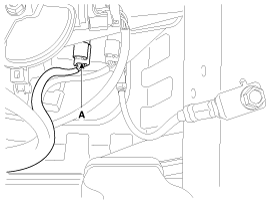
Disconnect the input shaft speed sensor connector (A).
|
| 4. |
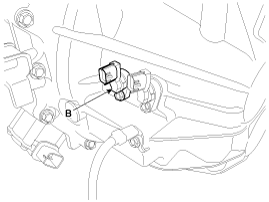
Loosen the mounting bolt and then remove the input shaft speed sensor
(B).
|
| Installation |
| 1. |
Install in the reverse order of removal.
|
 Input Speed Sensor 2 Schematic diagrams
Schematic Diagrams
...
 Inhibitor Switch Description and operation
Description
The inhibitor switch is mounted on the transmission case. It includes the electric
switch plate circuit and is directly connected with the transmission lever via
tran ...
Other information:
Kia Cee'd JD Service Manual: Hazard Lamp Switch Repair procedures
Inspection
1.
It will be able to diagnose defects of hazard switch with GDS quickly.
GDS can operates actuator forcefully, input/output value monitoring
and self diagnosis.
2.
Select model and "BCM".
...
Kia Cee'd JD Service Manual: Front Door Trim Repair procedures
Replacement
•
Put on gloves to protect your hands.
•
Be c ...
© 2017-2026 www.kceed.com
