
Kia Cee'd: Windshield Wiper/Washer / Front Washer Motor Repair procedures
Kia Cee'd JD Service Manual / Body Electrical System / Windshield Wiper/Washer / Front Washer Motor Repair procedures
| Inspection |
Front and Rear Washer Motor
| 1. |
With the washer motor connected to the reservoir tank, fill the reservoir
tank with water.
|

| 2. |
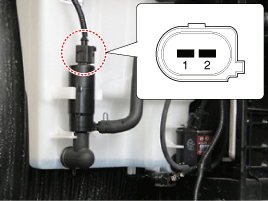
Connect positive (+) battery cables to terminal 1 and negative (-) battery
cables to terminal 2 respectively.
|
| 3. |
Check that the motor operates normally and the washer motor runs and
water sprays from the front nozzles.
|
| 4. |
If they are abnormal, replace the washer motor.
[Front & Rear washer]
|
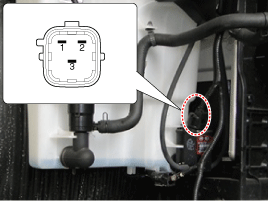
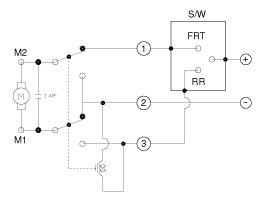
Washer Fluid Level Sensor Switch
| 1. |
Disconnect the negative(-) battery terminal.
|
| 2. |
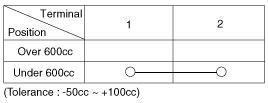
Drain the washer fluid less than 600 cc.
|
| 3. |
Check for continuity between the No. 1 and No.2 terminal in each float
position.
There should be continuity when the float is down.
There should be no continuity when the float is up.
|
| 4. |
If the continuity is not as specified, replace the washer fluid level
switch
|
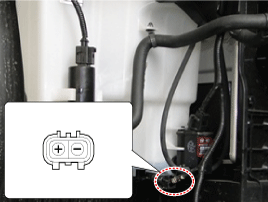
Head Lamp Washer Motor
| 1. |
With the washer motor connected to the reservoir tank, fill the reservoir
tank with water.
|
| 2. |
Connect positive (-) battery cables to terminal 2 and negative (+) battery
cables to terminal 1 respectively.
|
| 3. |
Check that the motor operates normally and the washer motor runs and
water sprays from the head lamp washer nozzles.
|
| 4. |
If they are abnormal, replace the head lamp washer motor.
|
| Removal |
|

| 1. |
Disconnect the negative (-) battery terminal.
|
| 2. |
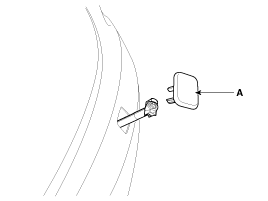
Remove the head lamp washer nozzle cover (A).
|
| 3. |
Remove the front bumper cover.
(Refer to Body - "Front Bumper Cover")
|
| 4. |
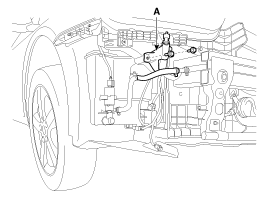
Remove the head lamp washer nozzle (A) after loosening bolts.
|
| 5. |
Remove the washer hose and disconnect the washer motor connector (A),
washer flid level sensor connector (B) and head lamp washer pump connector
(C).
|
| 6. |
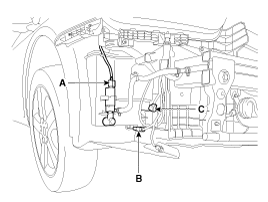
Remove the washer motor (A) and head lamp washer pump (B).
|
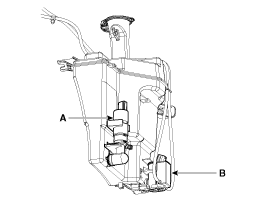
| 7. |
Remove the washer reservoir after removing bolts.
|
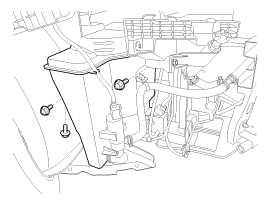
| Installation |
| 1. |
Reassemble the washer reservoir.
|
| 2. |
Connect the washer motor connector and washer hose.
|
| 3. |
Install the head lamp washer motor.
|
| 4. |
Install the head lamp washer nozzle.
|
| 5. |
Reassemble the front bumper cover.
|
 Front Wiper Motor Repair procedures
Removal
1.
Remove the cap (B) and remove the nuts, then remove the wiper arm (A).
Tightening torque :
22.6 ~ 26.5 N.m(2.3 ~ ...
 Rain Sensor Schematic diagrams
Circuit Diagram
...
Other information:
Kia Cee'd JD Owners Manual: Headrest
The rear seat is equipped with headrests
in all the seating positions for the occupant's
safety and comfort.
The headrest not only provides comfort
for passengers, but also helps protect the
head and neck in the event of a collision.
WARNING
For maximum effectiveness in
case of an ...
: Updating the System Using a Wi-Fi Network Connection
Connecting to a Wi-Fi Network
Select the settings option on
the
feature bar.
Select Automatic Updates.
Select System Wi-Fi.
Switch System Wi-Fi on.
Select Available Wi-Fi Networks.
Select an available Wi-Fi network.
Note: Enter the network password to
connect to a secure network.
Switchin ...
© 2017-2026 www.kceed.com
