
Kia Cee'd: Charging System / DC DC Converter Repair procedures
Kia Cee'd JD Service Manual / Engine Electrical System / Charging System / DC DC Converter Repair procedures
| Removal |
| 1. |
Disconnect the battery negative terminal.
|
| 2. |
Remove the glove box housing.
(Refer to Body - "Glove Box Housing")
|
| 3. |
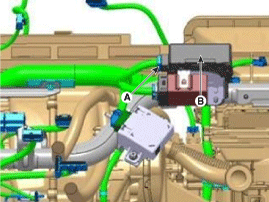
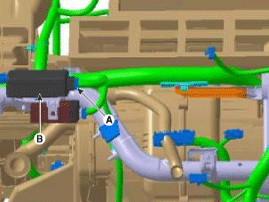
Disconnect the DC/DC converter conector (A).
|
| 4. |
Remove the DC/DC converter (B) after removing nuts.
[LHD]
[RHD]
|
| Installation |
| 1. |
Install in the reverse order of removal.
|

 DC DC Converter Schematic diagrams
Circuit Diagram
...
 Battery Description and operation
Description
1.
The MF(Maintenance Free) battery is, as the name implies, totally maintenance
free and has no removable battery cell caps.
2.
...
Other information:
Kia Cee'd JD Service Manual: Description and operation
System Overview
RPAS(Rear Parking Assist System) is an electronic driving aid device warning
driver to be cautious when they park or speed low after detecting an object
on side and behind of vehicle by using the feature of ultrasonic waves.
RPAS consists of four RPS senso ...
Kia Cee'd JD Service Manual: Specifications
Specifications
Items
Specification
Hood
Type
Rear hinged, front opening type
Front Door
Construction
Front hinged, full door construction
Regulator syst ...
© 2017-2026 www.kceed.com
