
Kia Cee'd: How the system works (Parking mode) / 4. Search complete
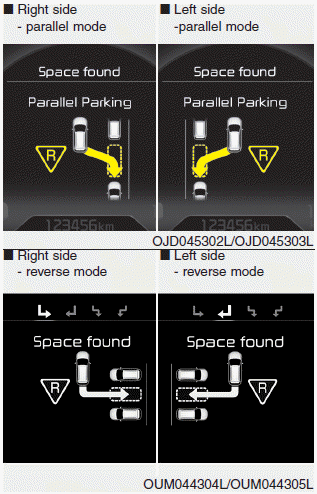
While driving forward to search for a parking space, the above message will appear with a beep sound if the search is complete. Stop the vehicle and shift to the R (Reverse) position.
CAUTION
- Always drive slowly with the brake pedal applied.
- If the parking space is to small the system may be cancelled at the Steering wheel control stage. Do not park your vehicle if the space is too small.
 3. Search for parking space (optional)
Slowly drive forward maintaining the
distance of approximately 50cm ~
150cm (19.6in.~59.0in.) with the
parked vehicles. The side sensors will
search for a parking space.
If the vehi ...
 5. Steering wheel control
The above message will appear if the
shift lever is in R (Reverse). The steering
wheel will be controlled automatically.
The system will be cancelled if you
firmly hold the steering wh ...
Other information:
Kia Cee'd JD Owners Manual: Electric chromic mirror (ECM)
The electric rearview mirror automatically
controls the glare from the headlights
of the car behind you in nighttime or low
light driving conditions. The sensor
mounted in the mirror senses the light
level around the vehicle, and automatically
controls the headlight glare from
vehicles ...
: Plug-In Hybrid Electric Vehicle Drive Modes
Selecting a Plug-In Hybrid Electric Vehicle Drive Mode
Your vehicle contains selectable electric
vehicle (EV) modes. Press the button on
the center console to change the mode.
Depending on your drive mode selection
some EV modes may not be available. EV
Now and EV Later modes are only
availabl ...
