
Kia Cee'd: Features of your vehicle / Wipers and washers
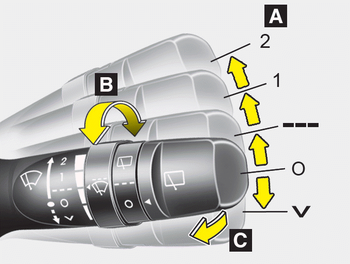
■ Front
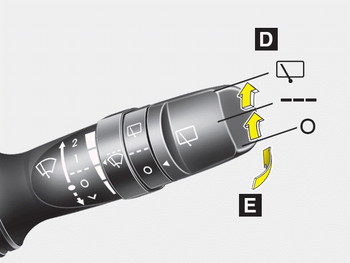
■ Rear
A :Wiper speed control (front)
· 2 – High wiper speed
· 1 – Low wiper speed
· --- – Intermittent wipe
· AUTO* – Automatic control wipe
· O – Off
· – Single wipe
B : Intermittent control wipe time adjustment
C :Wash with brief wipes (front)*
D : Rear wiper/washer control*
· – Continuous wipe
· --- – Intermittent wipe
· O – Off
E :Wash with brief wipes (rear)*
 Adaptive Front Lighting System
(AFLS)
Adaptive Front Lighting System
(AFLS)
Adaptive front lighting system uses the
steering angle and vehicle speed, to
keep your field of vision wide by swiveling
and leveling the headlamp.
Change the switch to the AUTO position
wh ...
 Windshield wipers (front)
Operates as follows when the ignition
switch is turned ON.
: For a single wiping cycle, move
the
lever to this position and release it.
The wipers will operate continuously if
the lever is ...
Other information:
Kia Cee'd JD Owners Manual: Manual transaxle shift indicator
This indicator informs you which gear is
desired while driving to save fuel.
For example
: Indicates that shifting up to
the 3rd
gear is desired (currently the shift
lever is in the 2nd or 1st gear).
: Indicates that shifting down to
the
3rd gear is desired (currently the
shift l ...
Kia Cee'd JD Owners Manual: With central door lock/unlock switch
It is operated by pressing the door lock/
unlock switch.
When you press the central door lock
switch, all vehicle doors will lock and
the indicator light on the switch will illuminate.
If any door is opened when the switch
is pressed, all doors will not lock.
If any door is unlo ...
