
Kia Cee'd: Windshield Wiper/Washer / Windshield Wiper-Washer Switch Repair procedures
Kia Cee'd JD Service Manual / Body Electrical System / Windshield Wiper/Washer / Windshield Wiper-Washer Switch Repair procedures
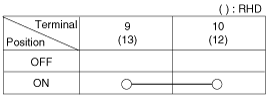
| Inspection |
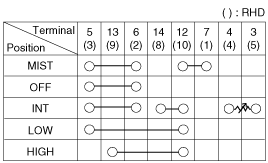
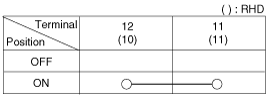
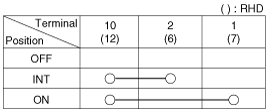
Check for continuity between the terminals while operating the wiper and washer
switch. If it is not normal condition, replace wiper and wiper switch.
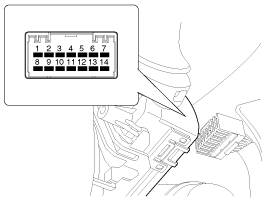
Wiper Switch
Washer Switch
Rear Wiper Switch
Rear Washer Switch
| Removal |
| 1. |
Remove the steering column shroud lower / upper panel.
(Refer to Body - "Steering Column Shroud Panel")
|
| 2. |
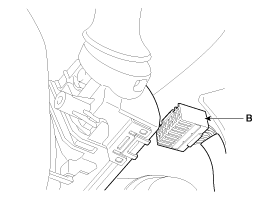
Disconnect the connector (A).
|
| 3. |
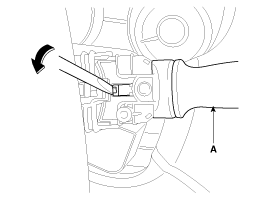
If it is necessary to remove. The wiper & washer switch (A) only, release
the lock of wiper switch using tool without removing the steering wheel
and the clock spring.
|
| 4. |
Remove the steering wheel.
(Refer to Steering System - "Steering Wheel")
|
| 5. |
Remove the clock spring.
(Refer to Restraint - "Driver Airbag (DAB) and Clock Spring")
|
| 6. |
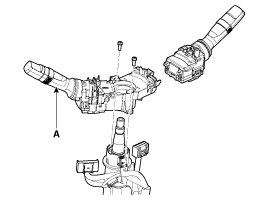
Remove the multifunction switch assembly (A) after loosening 2 screws.
|
| Installation |
| 1. |
Install the multifunction switch after connecting the connector.
|
| 2. |
Install the clock spring and steering.
|
| 3. |
Install the upper and lower shroud.
|
| 4. |
Install the steering wheel.
|
 Components and components location
Component Location
1. Windshield wiper arm & blade
2. Wiper & washer switch
3. Windshield washer hose
4. Windshield wiper motor & linkage
...
 Front Wiper Motor Components and components location
Component Location
1. Cap
2. Nut
3. Wiper arm & blade
4. Rivet
5. Cowl top cover
6. Bolt
7. Wiper motor & linkage assembly
...
Other information:
Kia Cee'd JD Owners Manual: Side impact air bag
Your vehicle is equipped with a side
impact air bag in each front seat. The
purpose of the air bag is to provide the
vehicle's driver and/or the front passenger
with additional protection than that
offered by the seat belt alone. The side
impact air bags are designed to deploy
only ...
Kia Cee'd JD Service Manual: Rear Door Belt Inside Weatherstrip Repair procedures
Replacement
1.
Remove the rear door trim.
(Refer to Rear Door - "Rear Door Trim")
2.
Remove the rear door belt inside weatherstrip (A).
3.
Install in the reverse order of removal ...
© 2017-2026 www.kceed.com
