
Kia Cee'd: Speed limit control system / Speed limit control switch
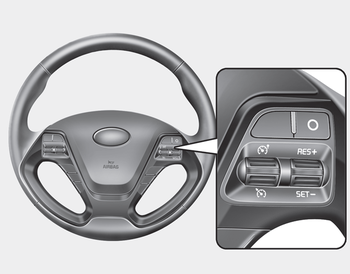
O: Cancels set speed limit.
 : Turns speed limit control
system on
or off.
: Turns speed limit control
system on
or off.
RES+: Resumes or increases speed limit control speed.
SET-: Sets or decreases speed limit control speed.
 Speed limit control system
You can set the speed limit when you do
not want to drive over a specific speed.
If you drive over the preset speed limit,
the warning system operates (set speed
limit will blink and chime wil ...
 To set speed limit
1. Move the lever up () on the
steering
wheel, to turn the system on.
The speed limit indicator light will illuminate.
2. Move the lever down (to SET-).
3. Move the lever up (to RES+) or ...
Other information:
Kia Cee'd JD Service Manual: Purge Control Solenoid Valve (PCSV) Description and operation
Description
Purge Control Solenoid Valve (PCSV) is installed on the surge tank and controls
the passage between the canister and the intake manifold. It is a solenoid valve
and is open when the ECM grounds the valve control line. When the passage is
open (PCSV ON), fuel vapo ...
Kia Cee'd JD Service Manual: Starter Repair procedures
Removal
1.
Disconnect the battery negative terminal.
2.
Remove the air duct and air cleaner assembly.
(Refer to Engine Mechanical System - "Air Cleaner")
3.
Disconnect the starter cable (B) ...
