
Kia Cee'd: Smart Key System / Smart Key Unit Components and components location
Kia Cee'd JD Service Manual / Body Electrical System / Smart Key System / Smart Key Unit Components and components location
| Component |
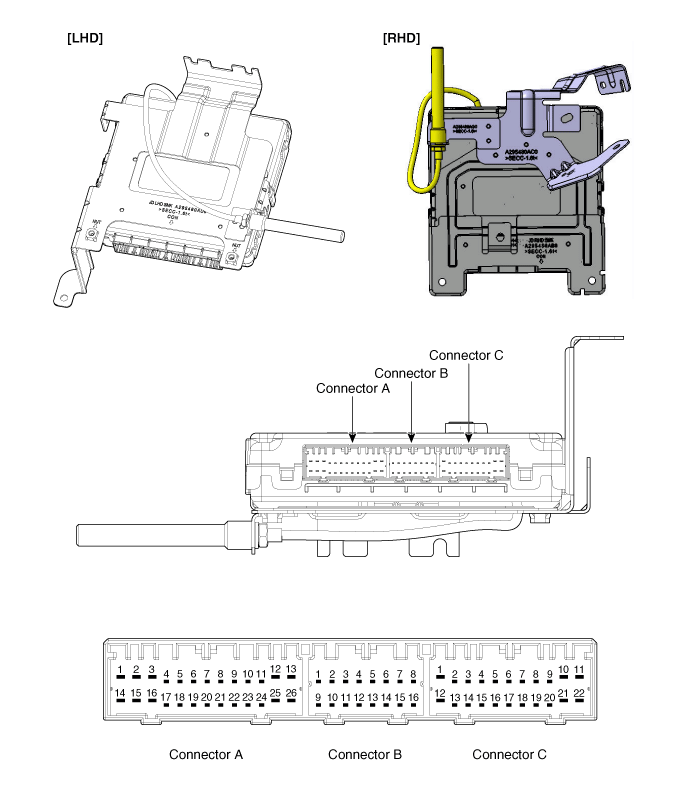
Connector Pin Information
|
No. |
Connector A(26 pins) |
No. |
Connector B(16 pins) |
No. |
Connector C(22 pins) |
|
1 |
Battery power load |
1 |
CAN H |
1 |
Start/Stop button switch illumination ground |
|
2 |
ESCL ground |
2 |
CAN L |
2 |
Immobilizer indicator |
|
3 |
Power ground1 |
3 |
- |
3 |
SSB LED OFF |
|
4 |
Ignition1 |
4 |
Stop lamp fuse |
4 |
Interior antenna #2 power |
|
5 |
Ignition1 relay |
5 |
Brake switch |
5 |
Interior antenna #1 power |
|
6 |
ACC |
6 |
Immobilizer antenna power |
6 |
- |
|
7 |
Ignition2 |
7 |
ESCL enable |
7 |
- |
|
8 |
SSB switch2 |
8 |
Wheel speed |
8 |
Trunk/Tailgate antenna power |
|
9 |
- |
9 |
Driver toggle button |
9 |
Bumper antenna power |
|
10 |
- |
10 |
ESCL unlock |
10 |
RH side antenna power |
|
11 |
ESCL COM |
11 |
External buzzer |
11 |
LH side antenna power |
|
12 |
CAN H |
12 |
P position/ Clutch switch |
12 |
SSB LED blue/ Ignition |
|
13 |
CAN L |
13 |
Start feedback |
13 |
SSB illumination power |
|
14 |
Battery voltage CPU |
14 |
Immobilizer antenna ground |
14 |
Keyout indicator |
|
15 |
ESCL battery |
15 |
Diagnostic - K |
15 |
Interior antenna #2 ground |
|
16 |
Power ground2 |
16 |
SSB LED amber/ ACC |
16 |
Interior antenna #1 ground |
|
17 |
Starter relay |
|
17 |
- |
|
|
18 |
Ignition2 relay |
18 |
- |
||
|
19 |
ACC relay |
19 |
Trunk/Tailgate antenna ground |
||
|
20 |
- |
20 |
Bumper antenna ground |
||
|
21 |
- |
21 |
RH side antenna ground |
||
|
22 |
- |
22 |
LH side antenna ground |
||
|
23 |
RPM |
|
|||
|
24 |
EMS COM |
||||
|
25 |
SSB switch1 |
||||
|
26 |
Assistant toggle button |
||||
 Smart Key Repair procedures
Smart Key
Smart Key Code Saving
1.
Connect the DLC cable of GDS to the data link connector in driver side
crash pad lower panel, turn the power on GDS.
...
 Smart Key Unit Schematic diagrams
Circuit Diagram
...
Other information:
Kia Cee'd JD Service Manual: Spark Plug Description and operation
Description
A spark plug is a device for delivering electric current from an ignition system
to the combustion chamber of a spark-ignition engine to ignite the compressed
fuel/air mixture therein by means of an electric spark, while containing combustion
pressure within the ...
: Setting the Clock and Date
Access the vehicle drawer on the
touchscreen.
Press SETTINGS.
Press Clock.
Set the time.Note: The AM and PM options are not
available if 24-hour mode is on.
Press the arrows to adjust the settings.
Switching Automatic Time Updates On and Off
Access the vehicle drawer on the
touchscreen ...
© 2017-2026 www.kceed.com
