
Kia Cee'd: Storage compartment / Sliding armrest
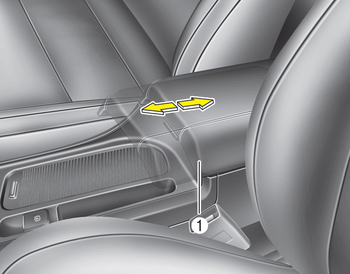
To move forward
Grab the front portion of the armrest (1) then pull it forward
To move rearward
Push the armrest rearward with your palm.
WARNING
Do not grab the front portion of the armrest (1) when moving the armrest rearward. It may pinch your fingers.
 Center console storage
To open the center console storage, push
the lever and then lift up the cover. ...
 Glove box
To open the glove box, push the button
and the glove box will automatically
open. Close the glove box after use.
WARNING
To reduce the risk of injury in an
accident or sudden stop, always
...
Other information:
: Lane Centering
How Does Lane Centering Work
Adaptive cruise control with lane centering
uses radar and camera sensors to help
keep your vehicle in the lane by applying
continuous assistance steering torque
input toward the lane center on highways.
Note: The adaptive cruise control gap
setting operates normall ...
Kia Cee'd JD Owners Manual: Panorama sunroof
If your vehicle is equipped with a sunroof,
you can slide or tilt your sunroof with the
sunroof control lever located on the overhead
console.
The sunroof can only be opened, closed,
or tilted when the ignition switch is in the
ON position.
In cold and wet climates, the sunroof
m ...
