
Kia Cee'd: Clutch Master Cylinder / Repair procedures
| Removal |
| 1. |
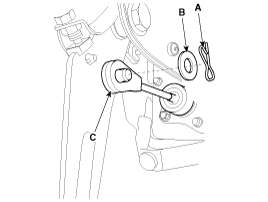
Separate the push rod (C) after remove the pin (A) and washer (B).
|
| 2. |
Remove the battery and battery tray.
G 1.6 MPI (Refer to Engine Electrical System - "Battery")
G 1.4 MPI (Refer to Engine Electrical System - "Battery")
D 1.6 TCI-U2 (Refer to Engine Electrical System - "Battery")
D 1.4 TCI-U2 (Refer to Engine Electrical System - "Battery")
G 1.6 GDI (Refer to Engine Electrical System - "Battery")
G 1.6 T-GDI (Refer to Engine Electrical System - "Battery")
|
| 3. |
Remove the ECM.
G 1.6 MPI (Refer to Engine Control / Fuel System - "Engine Control Module")
G 1.4 MPI (Refer to Engine Control / Fuel System - "Engine Control Module")
D 1.6 TCI-U2 (Refer to Engine Control / Fuel System - "Engine Control
Module")
D 1.4 TCI-U2 (Refer to Engine Control / Fuel System - "Engine Control
Module")
G 1.6 GDI (Refer to Engine Control / Fuel System - "Engine Control Module")
G 1.6 T-GDI (Refer to Engine Control / Fuel System - "Engine Control
Module")
|
| 4. |
The case of diesel vehicle, remove the fuel filter.
D 1.6 TCI-U2 (Refer to Engine Control / Fuel System - "Fuel Filter")
D 1.4 TCI-U2 (Refer to Engine Control / Fuel System - "Fuel Filter")
|
| 5. |
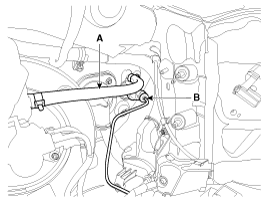
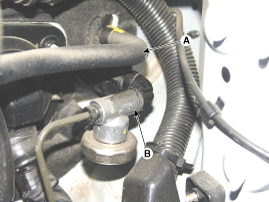
Disconnect the clutch tube (B) and reservoir hose (A) from the clutch
master cylinder.
[Gasoline]
[Diesel]
|

| 6. |
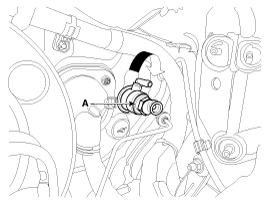
Remove the master cylinder (A) by rotating in a clockwise direction.
|
| Installation |
| 1. |
Install in the reverse order of removal.
|
| 2. |
After be equipped, perform bleeding air procedure in clutch release
cylinder after pouring the brake fluid.
(Refer to Clutch System - "Clutch release cylinder")
|
 Components and components location
Components
1. Master cylinder
2. Ignition lock switch
3. Clutch switch
4. Pedal pad
...

Other information:
Kia Cee'd JD Service Manual: Radiator Grill Components and components location
Component Location
1. Radiator grill
...
Kia Cee'd JD Owners Manual: Non-operating condition
The sensors are located inside of the
rear bumper.
Always keep the rear bumper clean for
the system to work properly.
WARNING
The warning light on the outside
rearview mirror will illuminate
whenever a vehicle is detected at
the rear side by the system.
To avoid accidents, do ...
© 2017-2026 www.kceed.com
