
Kia Cee'd: Rear Door / Rear Door Trim Repair procedures
| Replacement |
|

|

| 1. |
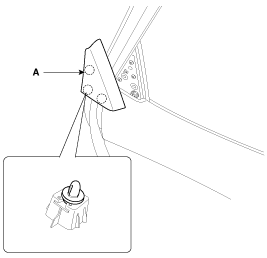
Using a screwdriver or remover, remove the rear door delta inner cover
(A).
|
| 2. |
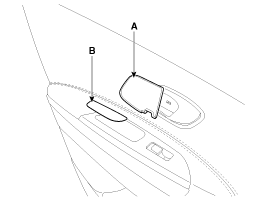
Using a screwdriver or remover, remove the rear door inside handle housing
(A) and rear door pull handle cap (B).
|
| 3. |
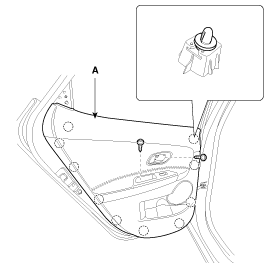
After loosening the mounting screws, then remove the rear door trim
(A).
|
| 4. |
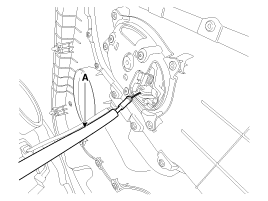
Disconnect the rear door inside handle cable (A).
|
| 5. |
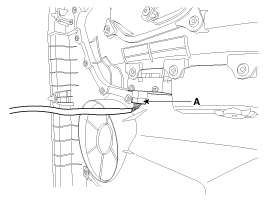
Disconnect the power window switch connector (A).
|
| 6. |
Install in the reverse order of removal.
|

 Rear Door Trim Components and components location
Component Location
1. Rear door trim
...
 Rear Door Inside Handle Repair procedures
Replacement
1.
Remove the rear door trim.
(Refer to Rear Door - "Rear Door Trim")
2.
After loosening the mounting scr ...
Other information:
Kia Cee'd JD Owners Manual: Snowy or Icy conditions
To drive your vehicle in deep snow, it may
be necessary to use snow tires or to
install tire chains on your tires. If snow
tires are needed, it is necessary to select
tires equivalent in size and type of the
original equipment tires. Failure to do so
may adversely affect the safety and h ...
Kia Cee'd JD Service Manual: Variable Intake Solenoid (VIS) Valve Description and operation
Description
Variable Intake manifold Solenoid (VIS) valve is installed on the intake manifold.
The VIS valve controls the vacuum modulator which activates a valve in the intake
manifold. The ECM opens or closes this valve according to engine condition (Refer
to below table). ...
