
Kia Cee'd: Rear Bumper / Rear Bumper beam Assembly Repair procedures
Kia Cee'd JD Service Manual / Body (Interior and Exterior) / Rear Bumper / Rear Bumper beam Assembly Repair procedures
| Replacement |
|

|

| 1. |
Remove the rear bumper cover.
(Refer to Rear Bumper - "Rear Bumper Cover")
|
| 2. |
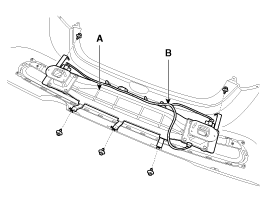
Disconnect the rear bumper beam mounting wiring harness (B).
|
| 3. |
Detach the clips, then remove the rear bumper beam assembly (A).
|
| 4. |
Install in the reverse order of removal.
|

 Rear Bumper beam Assembly Components and components location
Component Location
1. Rear bumper beam assembly
...
 Front Seat
...
Other information:
Kia Cee'd JD Service Manual: Spark Plug Specifications
Specification
Item
Specification
Type
SILZKR6810
Gap
0.9 ~ 1.0 mm (0.0354 ~ 0.0394 in.)
...
Kia Cee'd JD Owners Manual: Turn signals when towing a trailer
When you tow a trailer, your vehicle has
to have a different turn signal flasher and
extra wiring. The green arrows on your
instrument panel will flash whenever you
signal a turn or lane change. Properly
connected, the trailer lights will also flash
to alert other drivers you’re about ...
© 2017-2026 www.kceed.com
