
Kia Cee'd: Charging System / DC DC Converter Repair procedures
Kia Cee'd JD Service Manual / Engine Electrical System / Charging System / DC DC Converter Repair procedures
| Removal |
| 1. |
Disconnect the battery negative terminal.
|
| 2. |
Remove the glove box housing.
(Refer to Body - "Glove Box Housing")
|
| 3. |
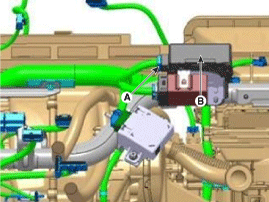
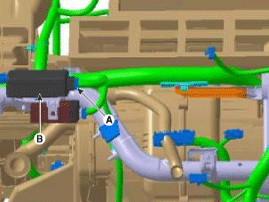
Disconnect the DC/DC converter conector (A).
|
| 4. |
Remove the DC/DC converter (B) after removing nuts.
[LHD]
[RHD]
|
| Installation |
| 1. |
Install in the reverse order of removal.
|

 DC DC Converter Schematic diagrams
Circuit Diagram
...
 Battery Description and operation
Description
1.
The MF(Maintenance Free) battery is, as the name implies, totally maintenance
free and has no removable battery cell caps.
2.
...
Other information:
Kia Cee'd JD Service Manual: Steering Column and Shaft Repair procedures
Replacement
1.
Remove the steering wheel.
(Refer to Steering Wheel - "Steering Wheel Assembly")
2.
Remove the steering column shroud.
3.
Remove the clock spring.
4.
...
: MyKey – Troubleshooting
MyKey – Information Messages - Vehicles With: Push Button Start
MyKey – Information Messages - Vehicles With: Flip Key
MyKey – Frequently Asked Questions - Vehicles With: Push Button Start
What is an admin key?
An admin key is a key that you have
not created as a MyKey. See Creating
a MyKe ...
© 2017-2026 www.kceed.com
