
Kia Cee'd: Power Windows / Power Window Switch Repair procedures
Kia Cee'd JD Service Manual / Body Electrical System / Power Windows / Power Window Switch Repair procedures
| Inspection |
Power Window Main Switch Inspection
| 1. |
Disconnect the negative (-) battery terminal.
|
| 2. |
Remove the front door trim.
(Refer to Body - "Front Door Trim")
|
| 3. |
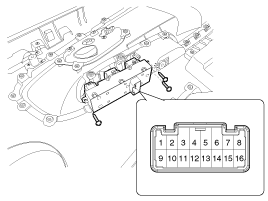
Disconnect the connector from the switch.
|
| 4. |
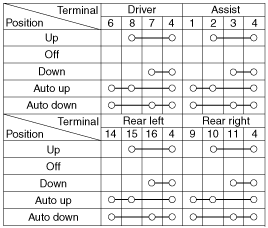
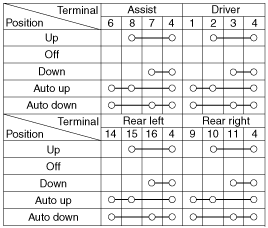
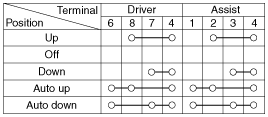
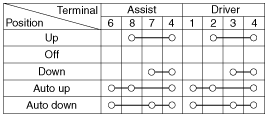
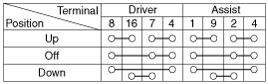
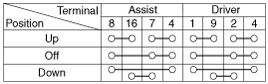
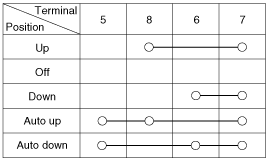
Check for continuity between the terminals in each switch position according
to the table. If the continuity condition is not normal, replace the
switch.
[4Door All Safety(LHD)]
[4Door All Safety(RHD)]
[2Door All Safety(LHD)]
[2Door All Safety(RHD)]
[2Door Auto Down(LHD)]
[2Door Auto Down(RHD)]
|
Passenger/Rear Power Window Switch Inspection
| 1. |
Disconnect the negative (-) battery terminal.
|
| 2. |
Remove the front door trim.
(Refer to Body - "Front Door Trim")
Remove the rear door trim.
(Refer to Body - "Rear Door Trim")
|
| 3. |
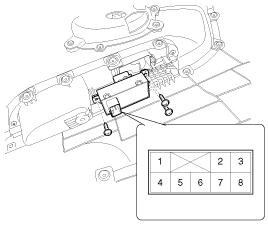
Disconnect the connector from the switch.
|
| 4. |
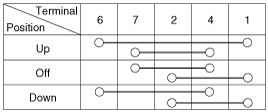
Check for continuity between the terminals in each switch position according
to the table. If the continuity condition is not normal, replace the
switch.
[Safety Up/Down]
[Manual Down]
|
 Power Window Switch Schematic diagrams
Circuit Diagram
Driver Power Window Switch
Passenger & Rear Power Window
Switch
...
 Power Window Relay Repair procedures
Inspection
1.
The power SJB can be diagnosed by using the GDS. The SJB communicates
with the GDS which then displays inputs and outputs along with codes.
...
Other information:
Kia Cee'd JD Service Manual: Front Seat Frame Assembly Components and components location
Component Location
1. Front seat back frame assembly
2. Front seat cushion frame assembly
...
Kia Cee'd JD Service Manual: Front Strut Assembly Components and components location
Components
1. Strut assembly
2. Insulator
3. Strut bearing
4. Spring upper pad
5. Coil spring
6. Dust cover
7. Spring lower pad
...
© 2017-2026 www.kceed.com
