
Kia Cee'd: Power Door Mirrors / Power Outside Mirror Switch Repair procedures
| Inspection |
| 1. |
Disconnect the negative (-) battery terminal.
|
| 2. |
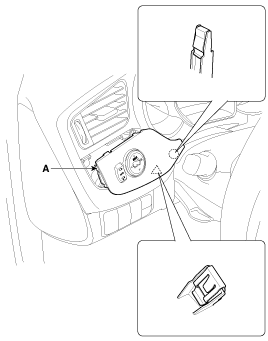
Remove the the crash pad garnish [LH] (A).
(Refer to Body - "Cluster Fascia Panel")
|
| 3. |
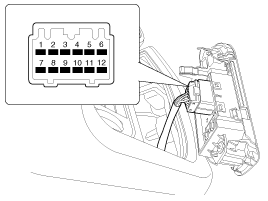
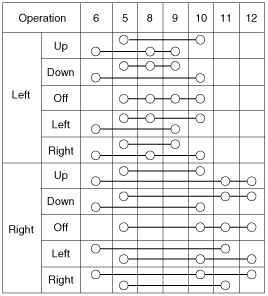
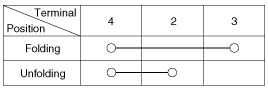
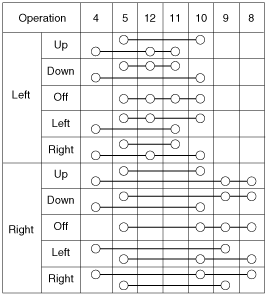
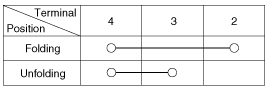
Check for continuity between the terminals in each switch position according
to the table.
[Power Mirror Switch (LHD)]
[Folding Mirror Switch (LHD)]
[Power Mirror Switch (RHD)]
[Folding Mirror Switch (RHD)]
|
| Removal |
| 1. |
Disconnect the negative(-) battery terminal.
|
| 2. |
Remove the the crash pad garnish [LH] (A).
(Refer to Body - "Cluster Fascia Panel")
|
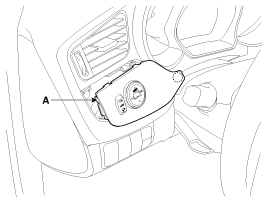
| 3. |
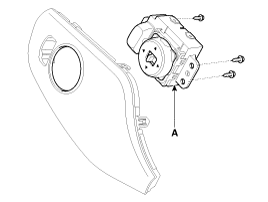
Disconnect the power door mirror switch connector (A).
|
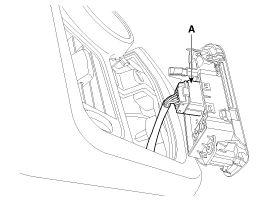
| 4. |
Remove the power door mirror switch (A) after loosening the mounting
screws.
|
| Installation |
| 1. |
Install the power window switch and connector.
|
| 2. |
Install the crash pad garnish [LH].
|
 Power Outside Mirror Switch Schematic diagrams
Circuit Diagram
...
 Power Door Mirror Actuator Repair procedures
Inspection
1.
Disconnect the negative (-) battery terminal.
2.
Remove the front door quadrant innen cover.
3. ...
Other information:
Kia Cee'd JD Service Manual: Description and operation
Description
Ignition timing is controlled by the electronic control ignition timing system.
The standard reference ignition timing data for the engine operating conditions
are pre-pro grammed in the memory of the ECM (Engine Control Module).
The engine operating conditi ...
Kia Cee'd JD Owners Manual: Dual clutch transmission
(DS mode) shift indicator
The indicator displays which Dual clutch
transmission shift lever is selected.
In DS mode, the “SPORTS” indicator displays
in cluster. For more detailed information
about DS mode, refer to the chapter
5.
CAUTION - DCT
When the problem of gear system
occurs, the transaxle indic ...
