
Kia Cee'd: Speed Limit Information Function (SLIF) / Operation
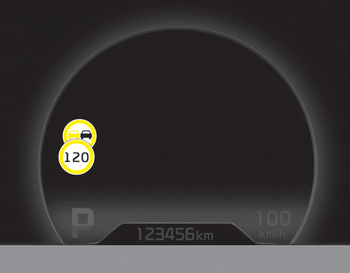
- If a traffic sign that is relevant to your vehicle is passed, the system displays the information of the speed limits and no passing restrictions to the driver.
- When the driver turn on the ignition, the system displays stored information of the speed limit before turn off the ignition.
- Sometimes different speed limits are displayed for the same road. The information displayed depending on the situation. Because, traffic signs with additional sign (e.g rainy, arrow...) are also detected and compared with vehicle interior data(e.g wiper operation, turn signal...).
- The system can update the speed limit
information without visible speed limit
signs in the following situations.
- When you change your driving direction with right or left or U turning.
- When vehicle changes roads. (e.g. from highway to country road…)
- When you enter or exit into town or village.
✽ NOTICE
If speed limit value has the difference between cluster and navigation, check the speed unit setting in navigation.
 SLIF activation / deactivation
SLIF Setting method :
Cluster User Settings → Driving Assist
→ SLIF (Speed Limit Information
Function)
The information of speed limit and no
passing restriction will appear on th ...
 Display
■ No reliable speed limit information
If the system doesn’t have a reliable
speed limit information, the following
symbol is displayed in both the instrument
cluster and navigation ...
Other information:
Kia Cee'd JD Service Manual: Ignition Coil Description and operation
Description
An ignition coil is an induction coil in an engine's ignition system which transforms
the battery's low voltage to the high voltage needed to create an electric spark
in the spark plugs to ignite the fuel. Coils have an internal resistor while
others rely ...
Kia Cee'd JD Service Manual: Steering Angle Sensor Description and operation
Description
The Steering Angle Sensor (SAS) is installed in MDPS (Motor Driven Power Steering)
and it sends messages to HECU through CAN communication line.
The SAS is used to determine turning direction and speed of the steering wheel.
The HECU uses the signals from th ...
