
Kia Cee'd: Lubrication System / Oil Pressure Switch Repair procedures
Kia Cee'd JD Service Manual / Engine Mechanical System / Lubrication System / Oil Pressure Switch Repair procedures
| Removal and Installation |
| 1. |
Remove the under cover.
|
| 2. |
Remove the oil drain plug, and drain the oil into a container.
|
| 3. |
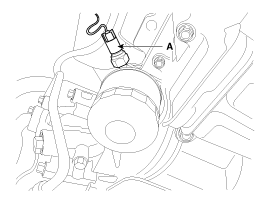
Remove the oil pressure switch(A).
|
| 4. |
Install in the reverse order of removal.
|
| Inspection |
| 1. |
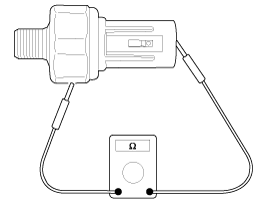
Check the continuity between the terminal and the body with an ohmmeter.
If there is no continuity, replace the oil pressure switch.
|
| 2. |
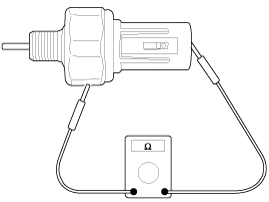
Check the continuity between the terminal and the body when the fine
wire is pushed.
If there is continuity even when the fine wire is pushed, replace the
switch.
|
| 3. |
If there is no continuity when a 49.0kpa (0.5kg/cm², 7.1psi) is applied
through the oil hole, the switch is operating properly.
Check for air leakage. If air leaks, the diaphragm is broken.
Replace it.
|
 Oil Pump Repair procedures
Removal and Installation
1.
Remove the timing chain cover.
(Refer to Timing System - "Timing Chain Cover")
2.
Remove ...
 Oil Pan Components and components location
Components
1. Gasket
2. Oil screen
3. Oil pan
4. Drain plug gasket
5. Drain plug
...
Other information:
Kia Cee'd JD Owners Manual: Rear window wiper and washer
switch
The rear window wiper and washer
switch is located at the end of the wiper
and washer switch lever. Turn the switch
to desired position to operate the rear
wiper and washer.
- Normal wiper operation
--- - Intermittent wipe
O - Wiper is not in operation
Push the lever away from you to ...
Kia Cee'd JD Service Manual: Repair procedures
Compession Pressure Inspection
If the there is lack of power, excessive oil consumption or poor fuel
economy, measure the compression pressure.
1.
Make sure the oil in the cran ...
© 2017-2026 www.kceed.com
