
Kia Cee'd: Brake System / Master Cylinder Repair procedures
| Removal [LHD] |
| 1. |
Turm ignition switch OFF and disconnect the negative (-) battery cable.
|
| 2. |
Remove the battery.
(Refer to Engine Electrical system-"Battery")
|
| 3. |
Remove the ECM.
(Refer to Engine control / Fuel System -"Engine Control Module")
|
| 4. |
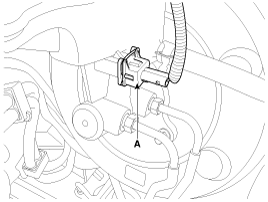
Disconnect the brake fluid level switch connector (A), and remove the
reservoir cap.
|
| 5. |
Remove the brake fluid from the master cylinder reservoir with a syringe.
|

| 6. |
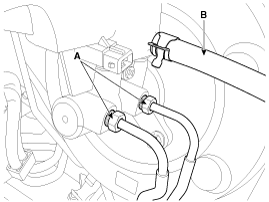
Disconnect the brake tube (A) from the master cylinder by loosening
the tube flare nut.
|
| 7. |
Remove the clutch hose (B). [MT only]
|
| 8. |
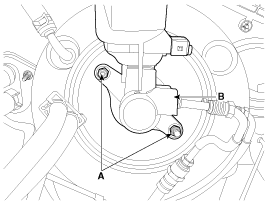
Remove the master cylinder (B) from the brake booster after loosening
the mounting nuts (A).
|
| Removal [RHD] |
| 1. |
Turm ignition switch OFF and disconnect the negative (-) battery cable.
|
| 2. |
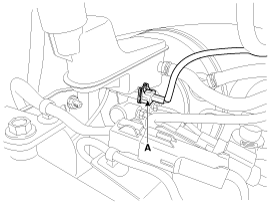
Disconnect the brake fluid level switch connector (A), and remove the
reservoir cap.
|
| 3. |
Remove the brake fluid from the master cylinder reservoir with a syringe.
|
| 4. |
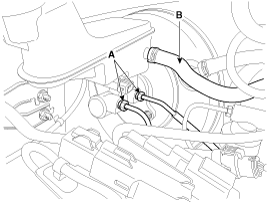
Disconnect the brake tube (A) from the master cylinder by loosening
the tube flare nut.
|
| 5. |
Remove the clutch hose (B). [MT only]
|
| 6. |
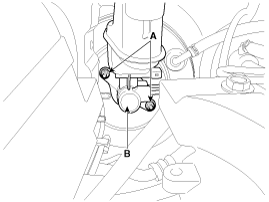
Remove the master cylinder (B) from the brake booster after loosening
the mounting nuts (A).
|
| Installation |
| 1. |
Install in the reverse order of removal.
|
| 2. |
After installation, bleed the brake system.
(Refer to Brake system bleeding)
|
 Master Cylinder Components and components location
Components [LHD]
1. Reservoir cap
2. Reservoir
3. Grommet
4. Master cylinder
Components [RHD]
1. Reserv ...
 Brake Line Components and components location
Components
...
Other information:
Kia Cee'd JD Service Manual: Blower Unit Repair procedures
Replacement
1.
Disconnect the negative (-) battery terminal.
2.
Remove the heater & blower assembly.
(Refer to Heater - "Heater Unit")
3.
Separate the blower unit from the heater un ...
Kia Cee'd JD Owners Manual: Operating condition
This system will activate when the indicator
on the rear parking assist OFF
button is not illuminated.
If you desire to deactivate the rear
parking assist system, press the rear
parking assist OFF button again. (The
indicator on the button will illuminate.)
To turn the syste ...
© 2017-2026 www.kceed.com
