
Kia Cee'd: Interior features / Luggage rail system (wagon)
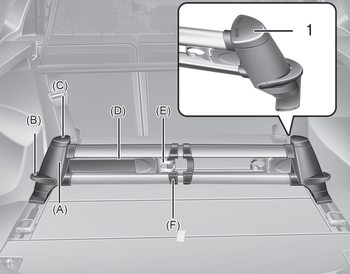
The luggage rail system may prevent the luggage from sliding around in the luggage compartment.
 To remove the cargo security screen
1. Push the guide pin inward.
2. While pushing the guide pin, pull out
the cargo security screen.
WARNING
Do not place objects on the cargo
security screen. Such objects
may be thrown ...
 Build in segmentation bar
Put both pillars (A) from the segmentation
bar in the openings from the rail.
To move the segmentation bar, put
your hand on the side of the pillar and
push down the lever arm (B).
Mak ...
Other information:
Kia Cee'd JD Service Manual: Repair procedures
Adjustment
1.
After loosening the hinge (A) mounting bolt, adjust the hood (B) by
moving it up or down, or right or left.
2.
Adjust the hood height by turning the hood overslam bumpers (C).
3.
Afte ...
Kia Cee'd JD Service Manual: Repair procedures
Replacement
1.
Disconnect the battery negative cable from the battery and then wait
for at least 30 seconds.
2.
Turn the steering wheel so that the front wheels can face straight ahead.
3.
Remove t ...
