
Kia Cee'd: IMS (Integrated Memory) / IMS Control Switch Repair procedures
Kia Cee'd JD Service Manual / Body Electrical System / IMS (Integrated Memory) / IMS Control Switch Repair procedures
| Inspection |
| 1. |
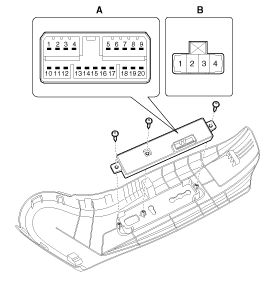
Remove the IMS control switch connector (A).
|
| 2. |
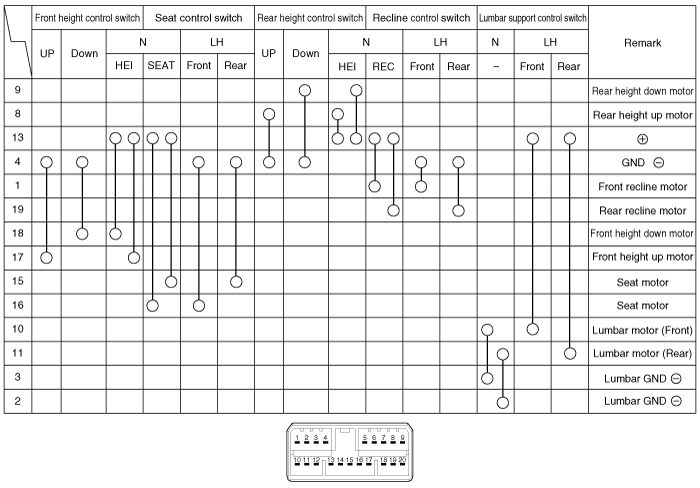
With the IMS control switch in each position, make sure that continuity
exists between the terminals below. If continuity is not as specified,
replace the IMS control switch.
Driver Power Seat Control Switch (For IMS)
|
| Removal |
| 1. |
Disconnect the negative (-) battery terminal.
|
| 2. |
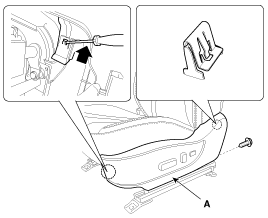
Remove the front seat shield outer cover (A).
(Refer to Body - "Front Seat Shield Outer Cover")
|
| 3. |
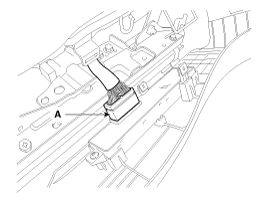
Disconnect the IMS control switch connector (A).
|
| 4. |
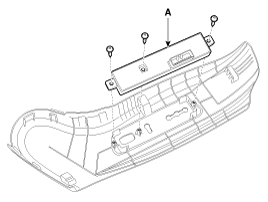
Remove the IMS control switch (A) after loosening the mounting screws.
|
| Installation |
|

| 1. |
Connect the connectors and reassemble the IMS control switch.
|
| 2. |
Reassemble the seat side cover.
|
 IMS Control Switch Schematic diagrams
Circuit diagram
...
 Fuel Filler Door
...
Other information:
: MyKey Settings
Non-Configurable MyKey Settings
Seatbelt Reminder or Belt-Minder™
MyKey mutes the audio system until the
front seat passengers buckle the front seat
belts.
Note: If your vehicle includes an AM/FM
radio or a very basic audio system, then the
radio may not mute.
Satellite Radio (If Equipped)
Som ...
: Lane Keeping System Indicators
If you switch the lane keeping system on,
a graphic with lane markings appears in
the information display.
When you switch the system off, the lane
marking graphics do not display.
Note: The overhead vehicle graphic may
still display if adaptive cruise control is
enabled.
While the lane keepin ...
© 2017-2026 www.kceed.com
