
Kia Cee'd: Hood / Hood Assembly Repair procedures
| Replacement |
|

|

| 1. |
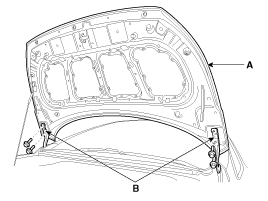
After loosening the hood hinge (B) mounting bolts, remove the hood assembly
(A).
|
| 2. |
Install in the reverse order of removal.
|
 Hood Assembly Components and components location
Component Location
1. Hood assembly
...
 Hood Weatherstrip Repair procedures
Replacement
1.
Remove the hood weatherstrip (A).
2.
Install in the reverse order of removal.
...
Other information:
Kia Cee'd JD Service Manual: Hood Latch Release Handle Repair procedures
Replacement
1.
Using a screwdriver or remover, remove the hood latch release handle
(A).
2.
Install in the reverse order of removal.
...
Kia Cee'd JD Service Manual: Rear Glass Defogger Printed Heater Repair procedures
Inspection
Wrap tin foil around the end of the voltmeter test lead to prevent damaging
the heater line. Apply finger pressure on the tin foil, moving the tin
foil along the grid line to check for open c ...
© 2017-2026 www.kceed.com
