
Kia Cee'd: Rear seat / Headrest
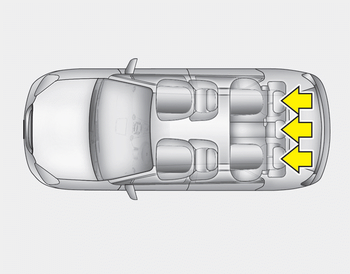
The rear seat is equipped with headrests in all the seating positions for the occupant's safety and comfort.
The headrest not only provides comfort for passengers, but also helps protect the head and neck in the event of a collision.
WARNING
- For maximum effectiveness in case of an accident, the headrest should be adjusted so the middle of the headrest is at the same height of the center of gravity of an occupant's head. Generally, the center of gravity of most people's head is similar with the height of the top of their eyes. Also adjust the headrest as close to your head as possible. For this reason, the use of a cushion that holds the body away from the seatback is not recommended.
- Do not operate the vehicle with the headrests removed. Severe injury to an occupant may occur in the event of an accident. Headrests may provide protection against severe neck injuries when properly adjusted.
Adjusting the height up and down
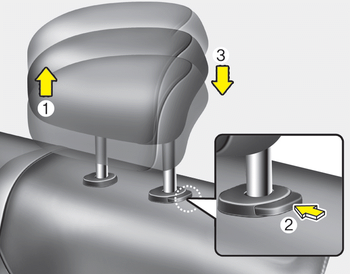
To raise the headrest, pull it up to the desired position (1). To lower the headrest, push and hold the release button (2) on the headrest support and lower the headrest to the desired position (3).
Removal and installation
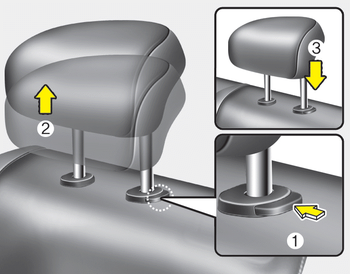
To remove the headrest, raise it as far as it can go then press the release button (1) while pulling the headrest up (2).
To reinstall the headrest, put the headrest poles (3) into the holes while pressing the release button (1). Then adjust it to the appropriate height.
WARNING
Make sure the headrest locks in position after adjusting it to properly protect the occupants.
 Rear seat
...
 Armrest
To use the armrest, pull it forward from
the seatback. ...
Other information:
Kia Cee'd JD Owners Manual: Using the Tire Mobility Kit
CAUTION
Detach the speed restriction
label (0) from the sealant bottle
(1), and place it in a highly visible
place inside the vehicle
such as on the steering wheel to
remind the driver not to drive
too fast.
1. Shake the sealant bottle.
2. Screw the filling hose (2) onto the
c ...
Kia Cee'd JD Service Manual: General information
Identification Number
Identification Number Description
Vehicle Identification Number
1.
World Manufacturer Identifier (WMI)
- KNA : Passenger vehicle, MPV(Multipurpose Passenger Vehicle)/SUV(Sports
Utility Vehicle)/RV(Recreational Vehic ...
