
Kia Cee'd: Driver position memory system / Headrest
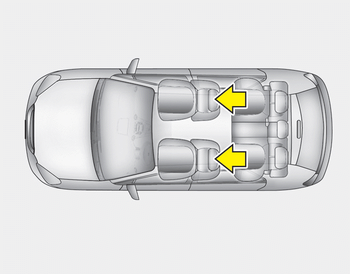
The driver's and front passenger's seats are equipped with a headrest for the occupant's safety and comfort.
The headrest not only provides comfort for the driver and front passenger, but also helps protect the head and neck in the event of a collision.
WARNING
- For maximum effectiveness in case of an accident, the headrest should be adjusted so the middle of the headrest is at the same height of the center of gravity of an occupant's head. Generally, the center of gravity of most people's head is similar with the height of the top of their eyes. Also, adjust the headrest as close to your head as possible. For this reason, the use of a cushion that holds the body away from the seatback is not recommended.
- Do not operate the vehicle with the headrests removed as severe injury to the occupants may occur in the event of an accident. Headrests may provide protection against neck injuries when properly adjusted.
- Do not adjust the headrest position of the driver's seat while the vehicle is in motion.
Forward and rearward adjustment
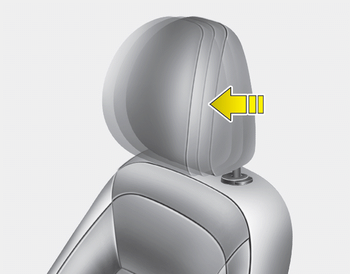
The headrest may be adjusted forward to 4 different positions by pulling the headrest forward to the desired detent. To adjust the headrest to it’s furthest rearwards position, pull it fully forward to the farthest position and release it. Adjust the headrest so that it properly supports the head and neck.
Adjusting the height up and down
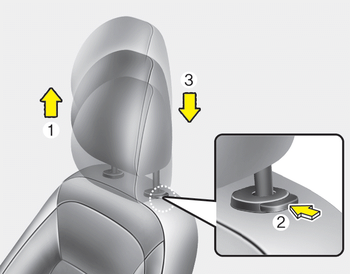
To raise the headrest, pull it up to the desired position (1). To lower the headrest, push and hold the release button (2) on the headrest support and lower the headrest to the desired position (3).
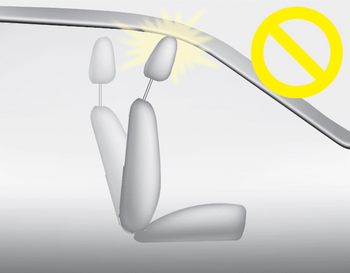
CAUTION
If you recline the seatback towards the front with the head restraint and seat cushion raised, the head restraint may come in contact with the sunvisor or other parts of the vehicle.
Removal and installation
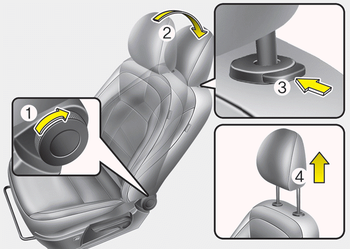
■ Type A
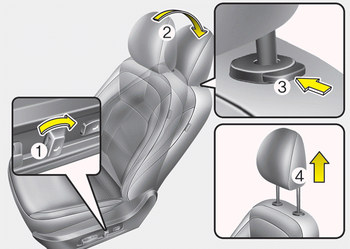
■ Type B
To remove the headrest:
1. Recline the seatback (2) with the recline lever or switch (1).
2. Raise headrest as far as it can go.
3. Press the headrest release button (3) while pulling the headrest up (4).
WARNING
NEVER allow anyone to ride in a seat with the headrest removed.
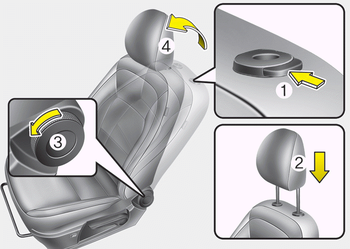
■ Type A
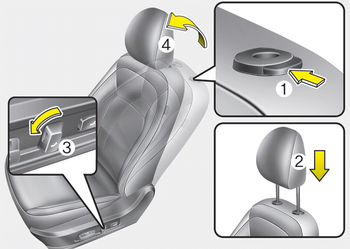
■ Type B
To reinstall the headrest :
1. Put the headrest poles (2) into the holes while pressing the release button (1).
2. Recline the seatback (4) with the recline lever or switch (3).
3. Adjust the headrest to the appropriate height.
WARNING
Always make sure the headrest locks into position after reinstalling and adjusting it properly.
 Easy access function
The system will move the driver's seat
automatically as follows:
Without smart key system
- It will move the driver’s seat rearward
when the ignition key is removed and
front driver’ ...
 Seat warmer
The seat warmer is provided to warm the
front seats during cold weather.With the
ignition switch in the ON position, push
either of the switches to warm the driver's
seat or the front passen ...
Other information:
Kia Cee'd JD Service Manual: Components and components location
Component Location
※ Parking assist control unit
function and buzzer are built in BCM (Body Control Module)
...
Kia Cee'd JD Service Manual: Repair procedures
On-vehicle Inpection
•
First of all, check for DTCs. If a DTC is present, perform troubleshooting
in accordance with the procedure for that DTC. (Refer to DTC
guide)
...
