
Kia Cee'd: Front light replacement / Front fog light, Daytime running light
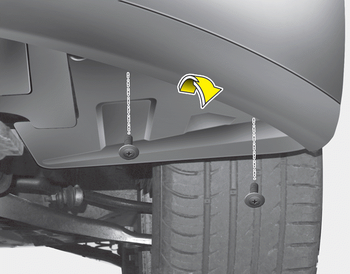
1. Pull the wheel guard down by rotating the screws.
2. Reach your hand into the back of the front bumper.
3. Disconnect the power connector from the socket.
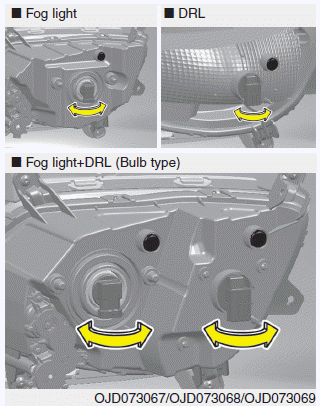
4. Remove the bulb-socket from the housing by turning the socket counter clockwise until the tabs on the socket align with the slots on the housing.
5. Install the new bulb-socket into the housing by aligning the tabs on the socket with the slots in the housing. Push the socket into the housing and turn the socket clockwise.
6. Connect the power connector to the socket.
 Turn signal light
Follow the steps 1 to 7 from the previous
page.
8. Remove the socket from the assembly
by turning the socket counterclockwise
until the tabs on the socket align with
the slots on the assemb ...

Other information:
Kia Cee'd JD Service Manual: Heater & A/C Control Unit (DATC) Components and components location
Components
Gasline
Connector Pin Function
Connector
Pin
No.
Function
Connector
Pin
No.
Function
A
1
Tail Lamp (+)
A
...
Kia Cee'd JD Service Manual: Crankshaft Position Sensor (CKPS) Repair procedures
Inspection
1.
Check signal waveform of CKPS and CMPS using a GDS.
Specification: Refer to “Waveform”
Removal
1.
Turn the ignition switch OFF and disconnect the battery negative ...
