
Kia Cee'd: Outside rearview mirror / Folding the outside rearview mirror
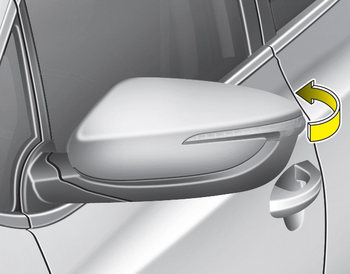
Manual type
To fold outside rearview mirror, grasp the housing of mirror and then fold it toward the rear of the vehicle.
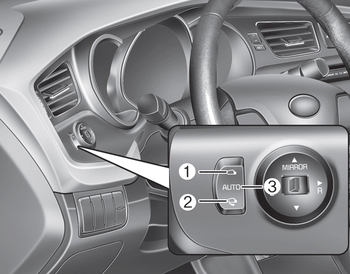
Electric type
The outside rearview mirror can be folded or unfolded by pressing the switch as below.
Up (1) : The mirror will unfold.
Down (2) : The mirror will fold. Center (AUTO, 3) :
The mirror will fold or unfold automatically as follows:
- Without smart key system
- The mirror will fold or unfold when the door is locked or unlocked by the transmitter. - With smart key system
- The mirror will fold or unfold when the door is locked or unlocked by the smart key.
- The mirror will fold or unfold when the door is locked or unlocked by the button on the outside door handle.
- The mirror will unfold when you approach the vehicle (all doors closed and locked) with a smart key in possession.
CAUTION
The electric type outside rearview mirror operates even though the ignition switch is in the OFF position. However, to prevent unnecessary battery discharge, do not adjust the mirrors longer than necessary while the engine is not running.
CAUTION
In case it is an electric type outside rearview mirror, don’t fold it by hand. It could cause motor failure.
 Remote control
The electric remote control mirror switch
allows you to adjust the position of the
left and right outside rearview mirrors. To
adjust the position of either mirror, move
the lever (1) to R ( ...
 Instrument cluster (Normal vision)
1. Tachometer
2. Speedometer
3. Fuel gauge
4.Warning and indicator lights (if equipped)
5. Turn signal indicators
6. LCD display ...
Other information:
: Federal Highway Administration Regulation
Regulations such as those issued by the
Federal Highway Administration or issued
pursuant to the Occupational Safety and
Health Act (OSHA), and state and local
laws and regulations may require
additional equipment for the way you
intend to use your vehicle. It is the
responsibility of the reg ...
: SYNC
Argentina
Brazil
China
Djibouti
European Union EU
Ghana
Jamaica
Malaysia
RBAB/57H/0318/S(18-0624)
Mauritania
Moldova
Morocco
Pakistan
Paraguay
NR: 2017-12-I-0000413
Serbia
Singapore
South Africa
South Korea
MSIP-CMM-pAs-FA-170-BCAR-HS
Taiwan
Ukraine
United Arab Emirates (U.A.E.)
...
