
Kia Cee'd: Button Engine Start System / Components and components location
Kia Cee'd JD Service Manual / Body Electrical System / Button Engine Start System / Components and components location
| Component Location |
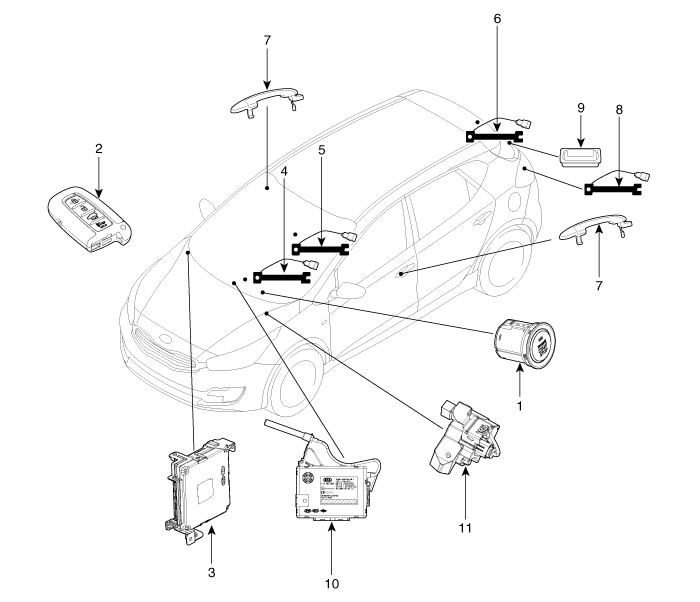
| 1. Start Stop Button (SSB)
2. FOB key 3. Smart key unit 4. Interior antenna 1 5. Interior antenna 2 6. Trunk antenna |
7. Door handle & door antenna
8. Bumper antenna 9. Tailgate open switch 10. BCM (Body Control Module) 11. ESCL (Electrical Steering Column Lock) |

 Schematic diagrams
Circuit Diagram
...
Other information:
: Cold Weather Precautions. Breaking-In. Driving Economically
Cold Weather Precautions
The functional operation of some
components and systems can be affected
at temperatures below approximately
-13°F (-25°C).
Breaking-In
You need to break in new tires for
approximately 300 mi (480 km). During
this time, your vehicle may exhibit some
unusual driving ch ...
Kia Cee'd JD Owners Manual: Speedometer
■ Type A
■ Type B • km/h
■ Type B • MPH
■ Type C • km/h
■ Type C • MPH
The speedometer indicates the vehicle
speed.
The speedometer is calibrated in kilometers
per hour and/or miles per hour. ...
© 2017-2026 www.kceed.com
