
Kia Cee'd: Brake System / Brake Pedal Repair procedures
| Removal [LHD] |
| 1. |
Turn ignition switch OFF and disconnect the negative (-) battery cable.
|
| 2. |
Remove the crash pad lower panel.
(Refer to Body - "Crash pad lower panel")
|
| 3. |
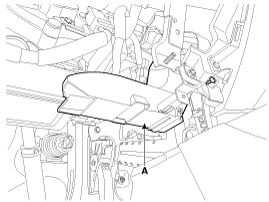
Remove the shower duct (A).
|
| 4. |
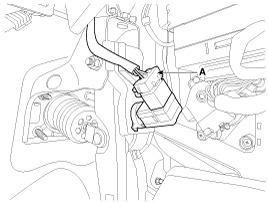
Disconnect the stop lamp switch connector (A).
|
| 5. |
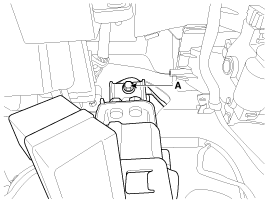
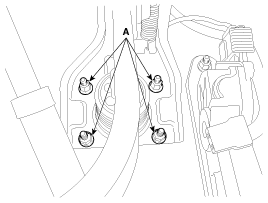
Remove the brake pedal member mounting bolt (A).
|
| 6. |
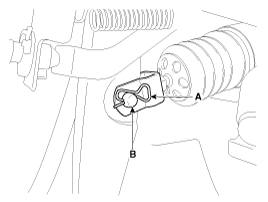
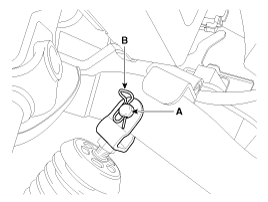
Remove the snap pin (A) and clevis pin (B).
|
| 7. |
Remove the brake pedal member assembly mounting nuts and then remove
the brake pedal assembly.
|
| Removal [RHD] |
| 1. |
Turn ignition switch OFF and disconnect the negative (-) battery cable.
|
| 2. |
Remove the crash pad lower panel.
(Refer to Body - "Crash pad lower panel")
|
| 3. |
Remove the junction box.
|
| 4. |
Disconnect the stop lamp switch connector (A).
|
| 5. |
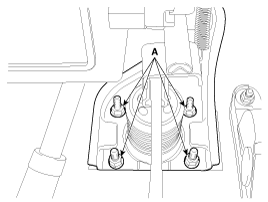
Remove the brake pedal member mounting bolt (A).
|
| 6. |
Remove the snap pin (A) and clevis pin (B).
|
| 7. |
Remove the brake pedal member assembly mounting nuts and then remove
the brake pedal assembly.
|
| Inspection |
| 1. |
Check the bushing for wear.
|
| 2. |
Check the brake pedal for bending or twisting.
|
| 3. |
Check the brake pedal return spring for damage.
|
| 4. |
Check the stop lamp switch.
|
| Installation [LHD] |
| 1. |
Pre-tighten the bracket fixing bolt (A) in dash panel.
|
| 2. |
Install the brake booster and brake pedal member fixing nuts (A) securely.
|
| 3. |
Tighten the bolt (A) securely in dash panel.
|
| 4. |
Install the snap pin (A) and clevis pin (B).
|

| 5. |
Install the stop lamp switch securely.
|
| 6. |
Connect the stop lamp switch connector (A).
|
| 7. |
Adjust the brake pedal height and free play.
|
| 8. |
Check the brake pedal operation after installing the brake pedal.
|
| 9. |
Install the shower duct (A).
|
| 10. |
Install the crash pad lower panel.
(Refer to Body - "Crash pad lower panel")
|
| 11. |
Reconnect the battery negative cable.
|
| Installation [RHD] |
| 1. |
Pre-tighten the bracket fixing bolt (A) in dash panel.
|
| 2. |
Install the brake booster and brake pedal member fixing nuts (A) securely.
|
| 3. |
Tighten the bolt (A) securely in dash panel.
|
| 4. |
Install the snap pin (A) and clevis pin (B).
|
| 5. |
Install the stop lamp switch securely.
|
| 6. |
Connect the stop lamp switch connector (A).
|
| 7. |
Adjust the brake pedal height and free play.
|
| 8. |
Check the brake pedal operation after installing the brake pedal.
|
| 9. |
Install the junction box.
(Refer to Body Electrical - "Relay Box")
|
| 10. |
Install the crash pad lower panel.
(Refer to Body - "Crash pad lower panel")
|
| 11. |
Reconnect the battery negative cable.
|
| Adjustment |
| Stop lamp switch clearance adjustment |
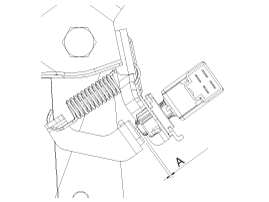
If the gap between stop lamp switch and bracket is not 1.0 ~ 2.0mm(0.04~ 0.08in),
conform to below.
| 1. |
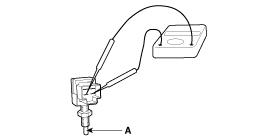
Disconnect the stop lamp switch connector (A).
|
| 2. |
Pull the locking plate (A) as indicated by the arrow.
|
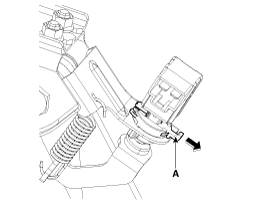
| 3. |
Turn stop lamp switch 45° counterclockwise and remove it.
|
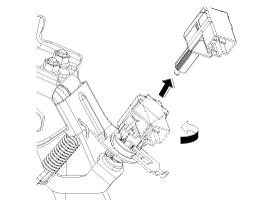
| 4. |
Fix the brake pedal arm and insert fully the stop lamp switch as hiding
contact part.
|
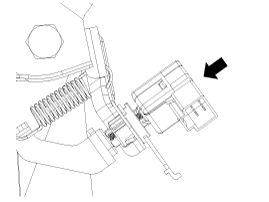
| 5. |
After inserting, turn the stop switch (A) 45° clockwise, and then assemble
locking plate (B) by pushing.
|
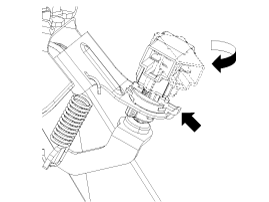
| 6. |
Confirm the gap between stop lamp switch and bracket.
|
| 7. |
Connect the stop lamp switch connector.
|
 Brake Pedal Components and components location
Components [LHD]
1. Cowl bracket
2. Brake pedal member assembly
3. Stop lamp switch
4. Return spring
5. Brake pedal
6. Bolt
...
 Front Disc Brake Components and components location
Components
1. Guide rod bolt
2. Bleed screw
3. Caliper carrier
4. Caliper body
5. Inner pad shim
6. Brake pad
7. Pad retainer
8. Retur ...
Other information:
Kia Cee'd JD Service Manual: Repair procedures
Inspection
Check it by the procedure below to see if the function of the ECM is normal.
1.
Turn the ignition key to the "ON" position.
2.
Cover the front sensor to stop functioning.
3.
Shin ...
Kia Cee'd JD Owners Manual: Air cleaner
Filter replacement
It must be replaced when necessary, and
should not be washed.
You can clean the filter when inspecting
the air cleaner element.
Clean the filter by using compressed air.
1. Loosen the air cleaner cover attaching
clips and open the cover.
2. Wipe the inside of the ...
© 2017-2026 www.kceed.com
