
Kia Cee'd: Features of your vehicle / Automatic climate control system
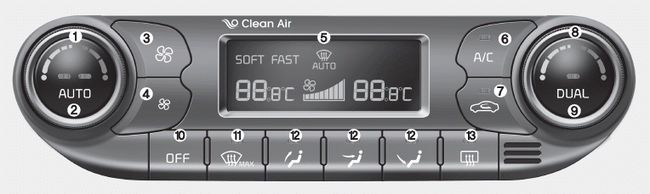
1. Driver's temperature control knob
2. AUTO (automatic control) button
3. Fan speed control button (Higher speed)
4. Fan speed control button (Lower speed)
5. Climate control display
6. Air conditioning button
7. Air intake control button
8. Passenger's temperature control knob
9. Dual temperature control selection button
10. OFF button
11. Front windshield defroster button
12. Mode selection button
13. Rear window defroster button
- Automatic heating and air conditioning
- Manual heating and air conditioning
- System operation
- Climate control air filter
- Checking the amount of air conditioner refrigerant and compressor lubricant
 Checking the amount of air conditioner
refrigerant and compressor
lubricant
Checking the amount of air conditioner
refrigerant and compressor
lubricant
When the amount of refrigerant is low,
the performance of the air conditioning is
reduced. Overfilling also has a bad influence
on the air conditioning system.
Therefore, if abnormal operation ...
 Automatic heating and air conditioning
The automatic climate control system is
controlled by simply setting the desired
temperature.
Soft mode
Fast mode
You can choose either the soft mode or
fast mode to select the fan speed. ...
Other information:
Kia Cee'd JD Owners Manual: Cool box
You can keep beverage cans or other
items cool in the glove box.
1. Turn on the air conditioning. The temperature
of the cool box will change
according to the temperature of air
conditioning.
2. Turn the knob to the open position.
3. When the cool box is not used, turn the
knob to the ...
: Programming the Garage Door Opener to Your Garage Door Opener Motor
Press the learn button on the garage
door opener motor, you have 30
seconds to complete the next two
steps.
Return to your vehicle.
Press and hold one of the three
HomeLink function buttons you want
to program for two seconds, then
release. Repeat this step. Depending
on your brand of ...
