
Kia Cee'd: System controllers and functions / Audio Head Unit
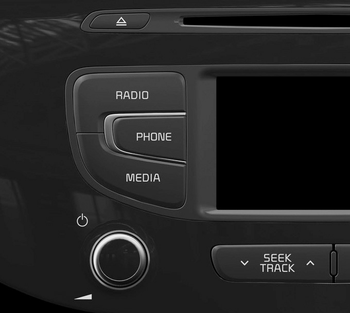
(1)  (EJECT)
Ejects the disc.
(EJECT)
Ejects the disc.
(2) 
Converts to Radio(FM/AM) mode.
Each time the key is pressed, the mode is changed in order of FM1 ➟ FM2 ➟ FMA ➟ AM ➟ AMA.
(3) 
Converts to Phone mode
❈ When a phone is not connected, the connection screen is displayed.
(4) 
Start Media mode
Each time the key is pressed, the mode is changed in order of CD, USB(iPod®) AUX, My Music, BT Audio.
(5) POWER/VOL knob
 Power : Press to turn power
on/off.
Power : Press to turn power
on/off.
Volume : Turn left / right to
control
volume.
(6) 
When pressed shortly (under 0.8 seconds)
- Radio mode : plays previous / next
frequency.
- Media (CD / USB / iPod® / My Music
/BT Audio) modes : changes the
track, Song(file)
When pressed and held (0.8 seconds)
- Radio mode : continuously changes
the frequency. Upon release, plays
the current frequency.
- Media(CD / USB / iPod® / My
Music) modes : rewinds or fast forwards
the track or file
- During a Handsfree call, controls
the call volume.
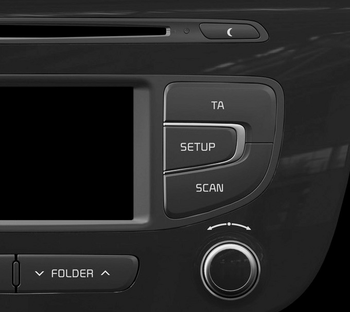
(7) 
• Each time the button is shortly pressed (under 0.8 seconds), sets Screen Off ➟ Screen On ➟ Screen Off
❈ Audio operation is maintained and only the screen will be turned Off. In the Screen Off state, press any key to turn the Screen On again.
(8) 
Set TA(Traffic Announcement) feature On/Off.
(9) 
Converts to Setup mode.
(10) 
- Radio Mode
- Press and hold the key (over 0.8 seconds): Previews each broadcast for 5 seconds each. - Media mode
- Press and hold the key (over 0.8 seconds): Previews each song (file) for 10 seconds each.
❈ Press and holding the key again to continue listening to the current song (file).
(11) TUNE knob
- Radio mode : turn to change
broadcast frequencies.
- Media (CD / USB / iPod® / My
Music) modes : turn to search
tracks/channels/files.
(12) 
MP3 CD / USB mode : Folder Search
❈ May differ depending on the selected audio.

 Steering-wheel mount controls
(1) : Mutes the microphone during
a call.
(2) ,
: Used to control volume.
(3) (If equipped)
When pressed shortly (under 0.8
seconds)
- Starts voice recognition
- When selecting during a vo ...
Other information:
: Front Parking Aid
(If Equipped)
What is the Front Parking Aid
Front parking sensors detect objects in
front of your vehicle.
Front Parking Aid Limitations
The front parking aid sensors are active
when your vehicle is in any position other
than park (P) and the vehicle speed is less
than 5 mph (8 km/h).
The sensor ...
Kia Cee'd JD Owners Manual: Air bag collision sensors
(1) SRS control module
(2) Front impact sensor
(3) Side impact sensor
WARNING
Do not hit or allow any objects to
impact the locations where air bag
or sensors are installed.
This may cause unexpected air
bag deployment, which could
result in serious personal injury
or deat ...
