
Kia Cee'd: Audio / Antenna Repair procedures
| Removal |
| 1. |
Remove the rear roof trim.
(Refer to Body - "Roof Trim Assembly")
|
| 2. |
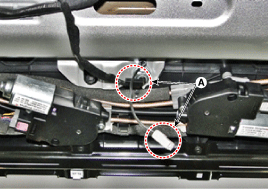
Disconnect the roof antenna connectors (A).
|
| 3. |
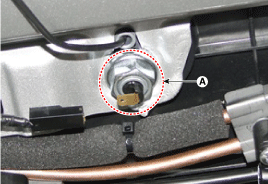
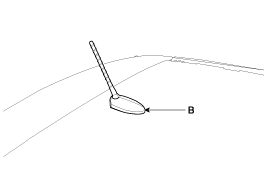
Remove the roof antenna (B) after loosening a nut (A).
|
| Installation |
| 1. |
Install the roof antenna.
|
| 2. |
Connect the roof antenna connector.
|
| 3. |
Install the rear roof trim.
|

 Antenna Components and components location
Components
...
 Audio Remote Control Schematic diagrams
Circuit Diagram
Type A
1. Remote control switch(LH:
Audio)
2. Remote control switch(RH: Cruise+Flex)
3. Bluetooth hands free switch
...
Other information:
Kia Cee'd JD Service Manual: Antenna Coil Repair procedures
Removal
1.
Disconnect the negative (-) battery terminal.
2.
Remove the steering column shroud panel.
(Refer to Body - "Crash Pad Lower Panel")
3.
Disconnect the connector (B) of the coil ...
Kia Cee'd JD Service Manual: Clutch Actuator Motor 1 (Odd Gear) Repair procedures
Inspection
1.
Turn off the ignition switch.
2.
Disconnect the clutch motor connector (A).
3.
Measure the resistance on the clutch motor terminal.
4.
Refer to the spec ...
© 2017-2026 www.kceed.com
