
Kia Cee'd: How the system works (Parking mode) / 4. Search complete
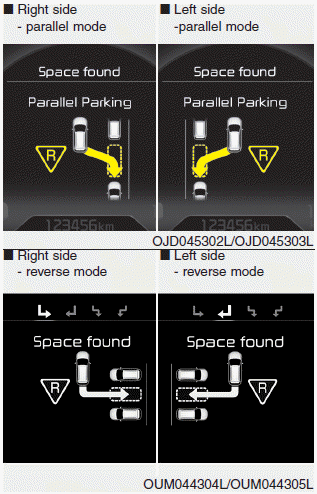
While driving forward to search for a parking space, the above message will appear with a beep sound if the search is complete. Stop the vehicle and shift to the R (Reverse) position.
CAUTION
- Always drive slowly with the brake pedal applied.
- If the parking space is to small the system may be cancelled at the Steering wheel control stage. Do not park your vehicle if the space is too small.
 3. Search for parking space (optional)
Slowly drive forward maintaining the
distance of approximately 50cm ~
150cm (19.6in.~59.0in.) with the
parked vehicles. The side sensors will
search for a parking space.
If the vehi ...
 5. Steering wheel control
The above message will appear if the
shift lever is in R (Reverse). The steering
wheel will be controlled automatically.
The system will be cancelled if you
firmly hold the steering wh ...
Other information:
Kia Cee'd JD Owners Manual: EPB malfunction indicator
This warning light illuminates if the
engine start/stop button is changed to
the ON position and goes off in approximately
3 seconds if the system is operation
normally.
If the EPB malfunction indicator remains
on, comes on while driving, or does not
come on when the ignition switch o ...
Kia Cee'd JD Service Manual: General information
General
The supplemental restraint system (SRS) is designed to supplement the seat belt
to help reduce the risk or severity of injury to the driver and passenger by
activating and deploying the driver, passenger, side airbag and belt pretensioner
in certain frontal or side c ...
