
Kia Cee'd: Gauges / Tachometer
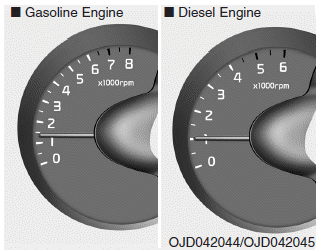
The tachometer indicates the engine speed in revolutions per minute (rpm).
Use the tachometer to select the correct shift points and to prevent lugging and/or over-revving the engine.
CAUTION
Do not operate the engine within the tachometer's RED ZONE. This may cause severe engine damage.
 Gauges
...
 Speedometer
■ Type A
■ Type B • km/h
■ Type B • MPH
■ Type C • km/h
■ Type C • MPH
The speedometer indicates the vehicle
speed.
The speedometer is calibrated in kilometers
pe ...
Other information:
: Rear View Camera
What Is the Rear View Camera
The rear view camera provides a video
image of the area behind your vehicle when
the transmission is in reverse (R).
Rear View Camera Precautions
WARNING: The rear view camera
system is a reverse aid supplement
device that still requires the driver to use
it in conj ...
: Active Park Assist – Troubleshooting
Active Park Assist – Information Messages
Active Park Assist – Frequently Asked Questions
Why does active park assist not operate correctly?
The system is unable to detect a
vehicle, curb or object to park next to
or in between. The system needs
boundary objects to operate correctly.
Why doe ...
