
Kia Cee'd: Electric Power Steering / Steering Column and Shaft Repair procedures
Kia Cee'd JD Service Manual / Steering System / Electric Power Steering / Steering Column and Shaft Repair procedures
| Replacement |
| 1. |
Remove the steering wheel.
(Refer to Steering Wheel - "Steering Wheel Assembly")
|
| 2. |
Remove the steering column shroud.
|
| 3. |
Remove the clock spring.
|
| 4. |
Remove the multifunction switch.
|
| 5. |
Remove the crash pad lower panel.
|
| 6. |
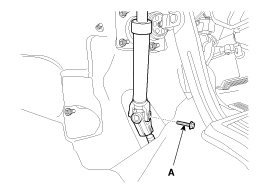
Loosen the bolt (A) and then disconnect the universal joint assembly
from the pinion of the steering gear box.
|

| 7. |
Remove the body control module.
|
| 8. |
Disconnect all connectors connected to the steering column.
|
| 9. |
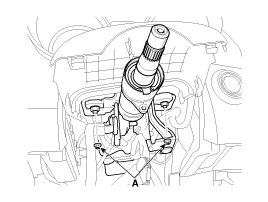
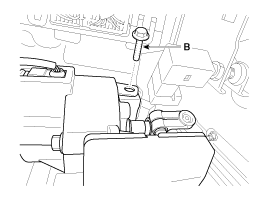
Remove the steering column & EPS unit assembly by loosening the mounting
bolt (B) and nuts (A).
|
| 10. |
Install in the reverse order of removal.
|
| 11. |
Register "ASP calibration EPS type recognition" by GDS after replacing
steering column assembly.
|
| Disassembly |
Universal joint assembly
| 1. |
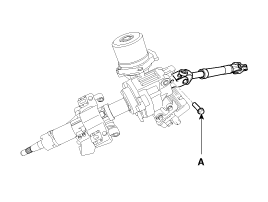
Loosen the bolt (A) and then disconnect the universal joint assembly
from the steering column assembly.
|
| 2. |
Reassembly is the reverse of the disassembly.
|
Key lock assembly
| 1. |
Make a groove on the head of special bolts (A) by a punch.
|
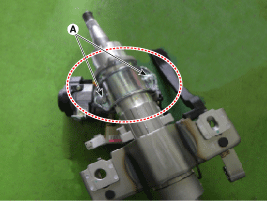
| 2. |
Loosen the special bolt using a screw driver and then remove the key
lock assembly from the steering column assembly.
|
| 3. |
Reassembly is the reverse of the disassembly.
|
| Inspection |
| 1. |
Check the steering column for damage and deformation.
|
| 2. |
Check the joint bearing for damage and wear.
|
| 3. |
Check the tilt bracket for damage and cracks.
|
| 4. |
Check the key lock assembly for proper operation and replace it if necessary.
|
 Repair procedures
General Inspection
After or before servicing the EPS system, perform the troubleshooting and test
procedure as follows. Compare the system condition with normal condition in
the ...
 Steering Gear box Components and components location
Components
1. Steering Gear box
...
Other information:
Kia Cee'd JD Service Manual: Intake Manifold Components and components location
Components
1. Intake manifold assembly
2. Intake manifold gasket
3. Electronic throttle body gasket
4. Electronic throttle body
5. Bracket
...
Kia Cee'd JD Owners Manual: USB Mode Menu
Within this mode, you will have
access to the Info, Random, Repeat,
Copy and List features.
Info
Press the button to display
details about the current file.
✽ NOTICE
When the ‘Folder File’ option is
set as the default display within
Display setup, the album/artist/file
...
© 2017-2026 www.kceed.com
