
Kia Cee'd: Button Engine Start System / Start/Stop Button Components and components location
Kia Cee'd JD Service Manual / Body Electrical System / Button Engine Start System / Start/Stop Button Components and components location
| Component |
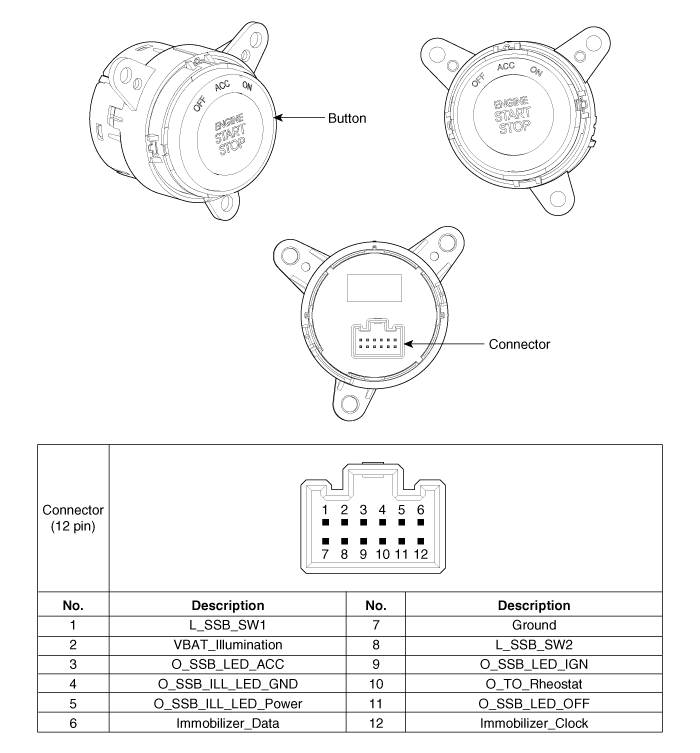
 Description and operation
Description
System Overview
The System offers the following features:
–
Human machine interface through a 1-stage button, for terminal switching
and en ...
 Start/Stop Button Repair procedures
Removal
1.
Disconnect the negative (-) battery terminal.
2.
Remove the crash pad center fascia panel.
(Refer to Body - "Ce ...
Other information:
Kia Cee'd JD Owners Manual: Sunvisor
Use the sunvisor to shield direct light
through the front or side windows.
To use a sunvisor, pull it downward.
To use a sunvisor for a side window, pull
it downward, unsnap it from the bracket
(1) and swing it to the side. (2)
To use the vanity mirror, pull down the
visor and open the ...
Kia Cee'd JD Service Manual: Description and operation
Description
CAN Communication Netrwork
Function
Function
Description
Front Washer & Wiper
–
Settings: IGN2 On,
–
Action : ...
© 2017-2026 www.kceed.com
