
Kia Cee'd: Features of your vehicle / Smart Parking Assist System (SPAS)
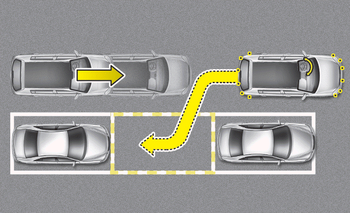
■ Parallel parking
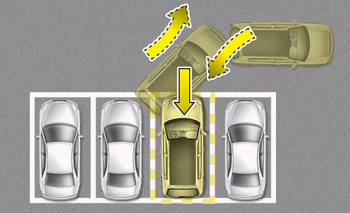
■ Reverse parking
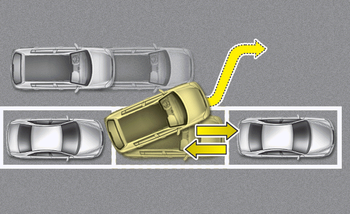
■ Parallel exit
The Smart Parking Assist System helps drivers park their vehicle by using sensors to measure parallel parking spaces, control the steering wheel to semi-automatically park the car and provide instruction on the LCD display to help through parking.
✽ NOTICE
- The vehicle will not stop for pedestrians or objects that may be in its path, so the driver must monitor the maneuver.
- Use the system only in parking lots and places used for parking.
- The system does not work if there is no car parked in front of the parking space you are planning to park or if it is a diagonal parking space.
- After parking your vehicle using the system, the vehicle may not be parked at the exact spot you have wished. For example, the space between your vehicle and wall may not be the distance you have desired.
- Deactivate the system and park your vehicle manually, when the situation requires parking manually.
- The Parking Assist System's front and rear warning sound activates when the Smart Parking Assist System is activated.
- After searching for a parking space is completed, the Smart Parking Assist System will be canceled if the Parking Assist System is cancelled by pressing the button to the OFF position.
WARNING
- The Smart Parking Assist System should only be considered as a supplementary function. The driver must check the front and rear view for objects. The operational function of the Smart Parking Assist System can be affected by many factors and conditions of the surroundings, so the responsibility rests always with the driver.
- The system may not operate normally if the vehicle needs wheel alignment adjustment. Have the vehicle checked by an authorized Kia dealer.
- If you use a different tire or wheel size rather than the size recommended by the Kia dealer, the system may not work properly. Always use the same size tire and wheel.
- If you use additional frame on license plate then SPAS may generate abnormal warning sound.
- Operating condition
- Non-operating condition
- How the system works (Parking mode)
- How the system works (Exit mode)
- Additional instructions(messages)
- System malfunction
 Self-diagnosis
When you shift the gear to the R
(Reverse) position and if one or more of
the below occurs you may have a malfunction
in the parking assist system.
You don't hear an audible warning
sound ...
 Operating condition
The system will help park the vehicle in
the middle or back of a parked vehicle.
Use the system when all the below conditions
are met.
When the parking space is a straight
line
When p ...
Other information:
: CD (If Equipped)
Once you select this option, the system
returns you to the main audio screen.
The current audio information appears on
the screen.
The following buttons are also available:
You can use the forward, reverse, pause or
play buttons to control the audio playback. ...
Kia Cee'd JD Owners Manual: Display Settings
Adjusting the Brightness
Press the key Select
[Display] Select [Brightness]
Use the ,
buttons to adjust the
screen brightness or set the
Brightness on Automatic, Day, or
Night mode.
Press the button to reset.
(1) Automatic : Adjusts the brightness
automatically
(2) Day : Always ...
