
Kia Cee'd: Fender / Repair procedures
| Replacement |
|

|

| 1. |
Remove the delta fixed glass.
(Refer to "Delta Fixed Glass" )
|
| 2. |
Remove the head lamps.
|
| 3. |
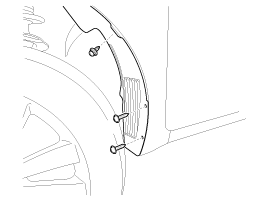
Loosen the front wheel guard mounting clip and screws.
|
| 4. |
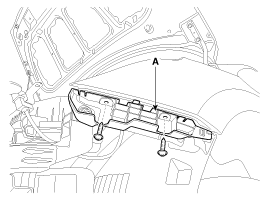
After loosening the mounting screws, then remove the front bumper side
mounting bracket (A).
|
| 5. |
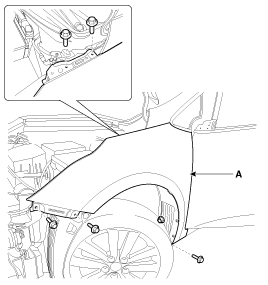
After loosening the fender mounting bolts and nut, then remove the fender
assembly (A).
|
| 6. |
Install in the reverse order of removal.
|
 Components and components location
Component Location
1. Fender assembly
...
 Hood
Hood
...
Other information:
: Towing a Trailer Precautions. Trailer Brake Precautions
Towing a Trailer Precautions
WARNING: Do not exceed
the GVWR or the GAWR
specified on the certification
label.
WARNING: Towing trailers
beyond the maximum
recommended gross trailer
weight exceeds the limit of your
vehicle and could result in engine
damage, transmission damage,
structural da ...
Kia Cee'd JD Service Manual: Components and components location
Component Location
1. Head lamp(High)
2. Head lamp(Low)
3. Position lamp
4. Turn signal lamp
5. Static bending lamp
6. Front fog lamp
7. DRL
8. Side repeater lamp (Door mirror)
9. Side repeater lamp
10. Overhead cons ...
© 2017-2026 www.kceed.com
