
Kia Cee'd: Clutch Master Cylinder / Repair procedures
| Removal |
| 1. |
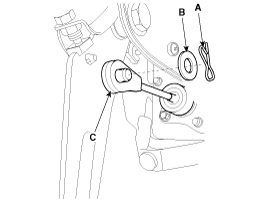
Separate the push rod (C) after remove the pin (A) and washer (B).
|
| 2. |
Remove the battery and battery tray.
G 1.6 MPI (Refer to Engine Electrical System - "Battery")
G 1.4 MPI (Refer to Engine Electrical System - "Battery")
D 1.6 TCI-U2 (Refer to Engine Electrical System - "Battery")
D 1.4 TCI-U2 (Refer to Engine Electrical System - "Battery")
G 1.6 GDI (Refer to Engine Electrical System - "Battery")
G 1.6 T-GDI (Refer to Engine Electrical System - "Battery")
|
| 3. |
Remove the ECM.
G 1.6 MPI (Refer to Engine Control / Fuel System - "Engine Control Module")
G 1.4 MPI (Refer to Engine Control / Fuel System - "Engine Control Module")
D 1.6 TCI-U2 (Refer to Engine Control / Fuel System - "Engine Control
Module")
D 1.4 TCI-U2 (Refer to Engine Control / Fuel System - "Engine Control
Module")
G 1.6 GDI (Refer to Engine Control / Fuel System - "Engine Control Module")
G 1.6 T-GDI (Refer to Engine Control / Fuel System - "Engine Control
Module")
|
| 4. |
The case of diesel vehicle, remove the fuel filter.
D 1.6 TCI-U2 (Refer to Engine Control / Fuel System - "Fuel Filter")
D 1.4 TCI-U2 (Refer to Engine Control / Fuel System - "Fuel Filter")
|
| 5. |
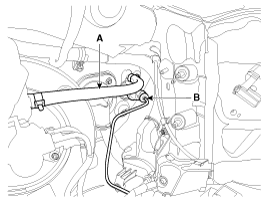
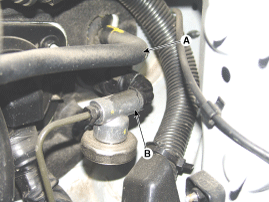
Disconnect the clutch tube (B) and reservoir hose (A) from the clutch
master cylinder.
[Gasoline]
[Diesel]
|

| 6. |
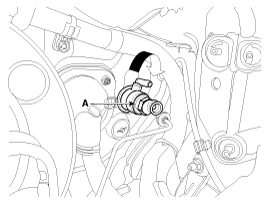
Remove the master cylinder (A) by rotating in a clockwise direction.
|
| Installation |
| 1. |
Install in the reverse order of removal.
|
| 2. |
After be equipped, perform bleeding air procedure in clutch release
cylinder after pouring the brake fluid.
(Refer to Clutch System - "Clutch release cylinder")
|
 Components and components location
Components
1. Master cylinder
2. Ignition lock switch
3. Clutch switch
4. Pedal pad
...

Other information:
: The Mediation and Arbitration Program. Ordering a Canadian French Owner's Manual
The Mediation and Arbitration Program
For vehicles delivered to authorized
Canadian dealers. In those cases where
you continue to feel that the efforts by Ford
of Canada and the authorized dealer to
resolve a factory-related vehicle service
concern have been unsatisfactory, Ford of
Canada part ...
Kia Cee'd JD Service Manual: Troubleshooting
Trouble Symptom Charts
Trouble Symptom 1
Trouble Symptom 2
Trouble symptom
Probable cause
Remedy
The set vehicle speed varies greatly upward or downward
"Surging" (repeated alterna ...
© 2017-2026 www.kceed.com
