
Kia Cee'd: Remote keyless entry / Remote keyless entry system operations
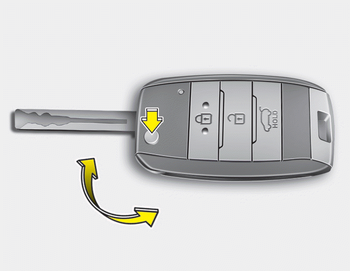
■ Type A
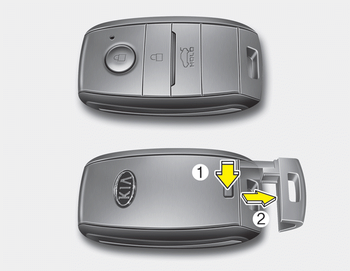
■ Type B
Type A
- To unfold the key, press the release button then the key will unfold automatically.
- To fold the key, fold the key manually while pressing the release button.
CAUTION
Do not fold the key without pressing the release button. This may OJD043244 damage the key.
Type B
- To remove the mechanical key, press and hold the release button and remove the mechanical key.
- To reinstall the mechanical key, put the key into the hole and push it until a click sound is heard.
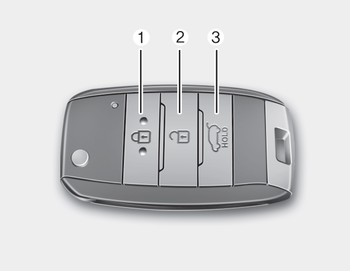
■ Type A
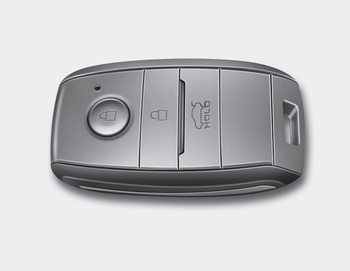
■ Type B

 Lock (1)
1. Close all doors.
2. Press the lock button.
3. The hazard warning light will blink
once to indicate that all doors are
locked (the engine hood and tailgate
must be closed). Also, the outside ...
Other information:
Kia Cee'd JD Owners Manual: To set cruise control speed
1. Move the lever down () on the
steering wheel, to turn the system on.
The cruise indicator light will illuminate.
2. Accelerate to the desired speed, which
must be more than 30 km/h (20 mph).
✽ NOTICE - Manual transaxle
For manual transaxle vehicles, you
should depress the brake ped ...
Kia Cee'd JD Service Manual: Description and operation
OBD-II review
1. Overview
The California Air Resources Board (CARB) began regulation of On Board Diagnostics
(OBD) for vehicles sold in California beginning with the 1988 model year. The
first phase, OBD-I, required monitoring of the fuel metering system, Exhaust
Gas Rec ...
