
Kia Cee'd: Lighting control / Position light position

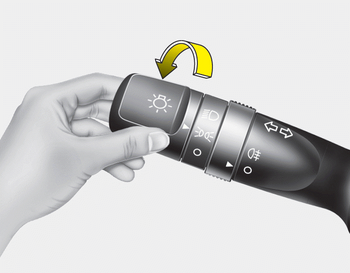
When the light switch is in the position light position, the tail, position, license and instrument panel lights are ON.
 Lighting control
The light switch has a Headlight and a
Parking light position.
To operate the lights, turn the knob at the
end of the control lever to one of the following
positions:
(1) OFF position
(2) P ...
 Headlight position
When the light switch is in the headlight
position the head, tail, position, license
and instrument panel lights are ON.
✽ NOTICE
The ignition switch must be in the ON
position to turn o ...
Other information:
: Manual Climate Control
Note: Depending on your vehicle option
package, the controls may look different
from what you see here.
Directing the Airflow
Press and release the button to
direct airflow to the windshield
air vents and de-mister.
Press and release the button to
direct airflow to the instrument
panel air ...
Kia Cee'd JD Service Manual: Rail Pressure Sensor (RPS) Description and operation
Description
Rail Pressure Sensor (RPS) is installed on the delivery pipe and measures the
instantaneous fuel pressure in the delivery pipe. The sensing element (Semiconductor
element) built in the sensor converts the pressure to voltage signal. By using
this signal, the ECM ...
