
Kia Cee'd: Bluetooth® Wireless Technology Audio Mode / Pairing PHONE key on the Steering Remote Controller
When No Devices have been Paired
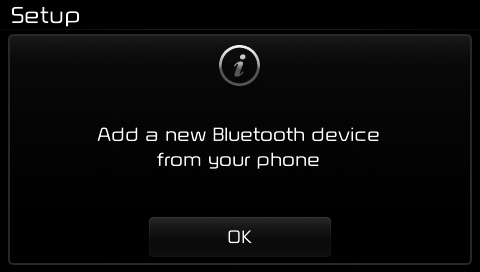
1. Press the  key or the
 key on the steering remote
controller.
The following screen is displayed.
key on the steering remote
controller.
The following screen is displayed.
2. Press the  button to enter the
Pair Phone screen.
button to enter the
Pair Phone screen.
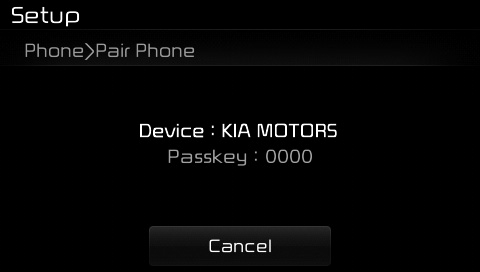
(1) Device : Name of device as shown when searching from your Bluetooth® Wireless Technology device
(2) Passkey : Passkey used to pair the device
3. From your Bluetooth® Wireless Technology device (i.e. Mobile Phone), search and select your car audio system.
[Non SSP supported device]
(SSP: Secure Simple Pairing)
4. After a few moments, a screen is displayed where the passkey is entered.
Enter the passkey “0000” to pair your Bluetooth® Wireless Technology device with the car audio system.
[SSP supported device]
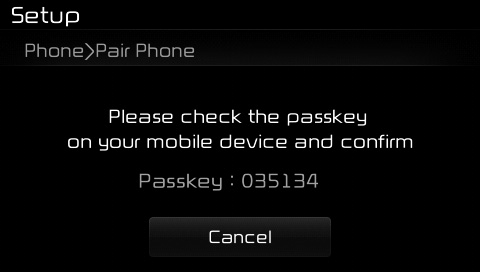
4. After a few moments, a screen is displayed 6 digits passkey.
Check the passkey on your Bluetooth® Wireless Technology device and confirm.
5. Once pairing is complete, the following screen is displayed.
Some phones (i.e., iPhone®, Android and Blackberry phones) may offer an option to allow acceptance of all future Bluetooth connection requests by default." and "Visit http://www.kia. com/#/bluetooth for additional information on pairing your Bluetoothenabled mobile phone, and to view a phone compatibility list.
✽ NOTICE
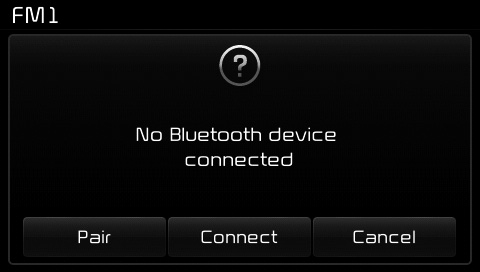
If Bluetooth® Wireless Technology
devices are paired but none are currently
connected, pressing the
key or the
key on the
steering wheel displays the following
screen. Press the [Pair] button to
pair a new device or press the
[Connect] to connect a previously
paired device.
 What is Bluetooth® Wireless
Technology Pairing?
What is Bluetooth® Wireless
Technology Pairing?
Pairing refers to the process of synchronizing
your Bluetooth® Wireless
Technology phone or device with the
car audio system for connection.
Pairing is necessary to connect and
use the Blue ...
 Pairing through [PHONE]
Setup
Pairing through [PHONE]
Setup
Press the key Select
[Phone] Select [Pair Phone]
The following steps are the same as
those described in the section "When
No Devices have been Paired" on the
previous page.
✽ NOTICE
...
Other information:
Kia Cee'd JD Owners Manual: Speed limiter indicator
The indicator illuminates when the speed
limit control system is enabled by move
the lever up on the steering wheel.
The indicator goes off when the
lever
up again to deactivate the system.
If there is a problem with the speed limit
control system, the “---” indicator will blink. ...
: Launching or Retrieving a Boat or Personal Watercraft. Towing Weights and Dimensions
Launching or Retrieving a Boat or Personal Watercraft
When backing down a ramp during boat
launching or retrieval:
Do not allow the static water level to
rise above the bottom edge of the rear
bumper.
Do not allow waves to break higher
than 6 in (15 cm) above the bottom
edge of the rear ...
