
Kia Cee'd: Engine start/stop button position / OFF
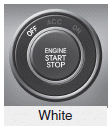
With manual transaxle
To turn off the engine (START/RUN position) or vehicle power (ON position), stop the vehicle then press the engine start/stop button.
With automatic transaxle/DCT*
To turn off the engine (START/RUN position) or vehicle power (ON position), press the engine start/stop button with the shift lever in the P (Park) position. When you press the engine start/stop button without the shift lever in the P (Park) position, the engine start/stop button will not change to the OFF position but to the ACC position.
Vehicles equipped with anti-theft steering column lock
The steering wheel locks when the engine start/stop button is in the OFF position to protect you against theft. It locks when the door is opened.
If the steering wheel is not locked properly when you open the driver's door, the warning chime will sound. Try locking the steering wheel again. If the problem is not solved, we recommend that the system be checked by an authorized Kia dealer.
In addition, if the engine start/stop button is in the OFF position after the driver's door is opened, the steering wheel will not lock and the warning chime will sound. In such a situation, close the door. Then the steering wheel will lock and the warning chime will stop.
✽ NOTICE
If the steering wheel doesn't unlock properly, the engine start/stop button will not work. Press the engine start/stop button while turning the steering wheel right and left to release the tension.
CAUTION
You are able to turn off the engine (START/RUN) or vehicle power (ON), only when the vehicle is not in motion. In an emergency situation while the vehicle is in motion, you are able to turn the engine off and to the ACC position by pressing the engine start/stop button for more than 2 seconds or 3 times successively within 3 seconds. If the vehicle is still moving, you can restart the engine without depressing the brake pedal by pressing the engine start/stop button with the shift lever in the N (Neutral) position.

 ACC(Accessory)
With manual transaxle
Press the engine start/stop button when
the button is in the OFF position without
depressing the clutch pedal.
With automatic transaxle/DCT
Press the engine start/stop b ...
Other information:
Kia Cee'd JD Service Manual: Specifications
Specifications
Items
Specifications
Rated voltage
DC 12V
Operating voltage
DC 9 ~ 16V
Operating temperature
-30°C~ 80°C (-22°F~176°F)
Dark cur ...
Kia Cee'd JD Service Manual: Front Pillar Trim Repair procedures
Replacement
•
Put on gloves to protect your hands.
•
Use ...
