
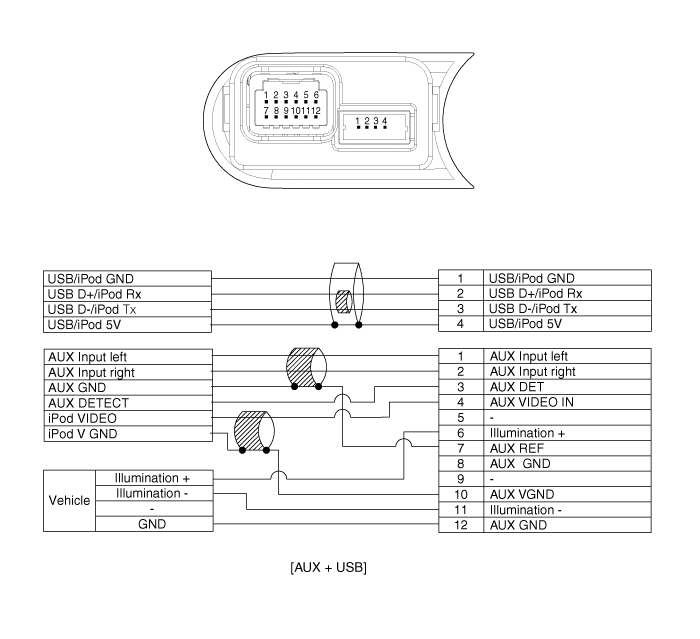
Kia Cee'd: AVN System / Multimedia Jack Schematic diagrams
Kia Cee'd JD Service Manual / Body Electrical System / AVN System / Multimedia Jack Schematic diagrams
| Circuit Diagram |
 Roof Antenna Repair procedures
Removal
1.
Remove the rear roof trim.
(Refer to Body - "Roof Trim Assembly")
2.
Disconnect roof antenna connectors (A ...
 Multimedia Jack Description and operation
Description
The multimedia jack on the console upper cover is for customers who like to
listen to external portable music players like the MP3, iPod and etc., through
the vehicle ...
Other information:
Kia Cee'd JD Service Manual: Troubleshooting
Troubleshooting
1.
The lamp switch inputs can be checked using the GDS.
2.
To check the input value of lamp switch, select option "Body Control
Module".
3.
To consult the present input/outpu ...
Kia Cee'd JD Owners Manual: Safety chains
You should always attach chains
between your vehicle and your trailer.
Cross the safety chains under the tongue
of the trailer so that the tongue will not
drop to the road if it becomes separated
from the hitch.
Instructions about safety chains may be
provided by the hitch manufacturer ...
© 2017-2026 www.kceed.com
