
Kia Cee'd: Your vehicle at a glance / Interior overview
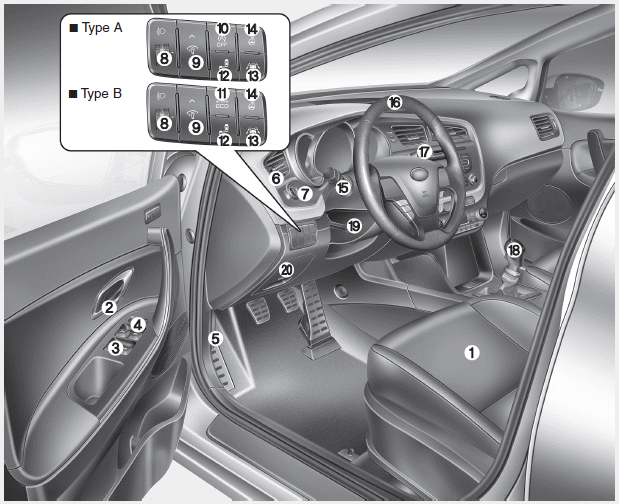
1. Seat
2. Inside door handle
3. Power window switch
4. Power window lock button
5. Hood release lever
6. Outside rearview mirror folding
7. Outside rearview mirror control
8. Headlight leveling device
9. Instrument panel illumination control
system
10. Idle Stop and Go (ISG) OFF button
11. Active ECO button
12. Blind spot detection system
ON/OFF button
13. Lane departure warning system
ON/OFF button
14. Heated steering wheel button
15. Light control/Turn signals
16. Steering wheel
17. Wiper/Washer
18. Transaxle shift lever
19. Tilt and telescopic steering
control lever
20. Fuse box
 Exterior overview (rear)
1. Roof antenna
2. Rear window defroster
3. Rear wiper
4. Door lock
5. Rear parking assist system
6. Child-protector rear door lock
7. Fuel filler
8. Rear towing hook
9. Rear combination lam ...
 Instrument panel overview
1. Instrument cluster
2. Horn
3. Steering wheel audio control
4. Cruise control switch
Speed limiter control switch
Cluster display mode conversion
switch
5. Driver’s air bag
6. Ignition ...
Other information:
Kia Cee'd JD Service Manual: Hands Free Switch Repair procedures
Inspection
Type A
1.
Check the audio remote control switch (A) for resistance between connector
3 and 4 in each switch position.
[Audio]
Switch
Connector
terminal
...
: Body Control Module Fuse Box.
Locating the Body Control Module Fuse Box
Accessing the Body Control Module Fuse Box
Identifying the Fuses in the Body Control Module Fuse Box
...
